












Home Blog Page 120

Unboxing and Review of GELID Phantom Black CPU Cooler

GELID Phantom Black CPU Cooler

We have previously checked out the GELID Phantom CPU cooler. There is also a Phantom Black edition cooler with very similar specifications. Let’s take a look at the differences between the two.


Unboxing
GELID Phantom Black CPU Cooler

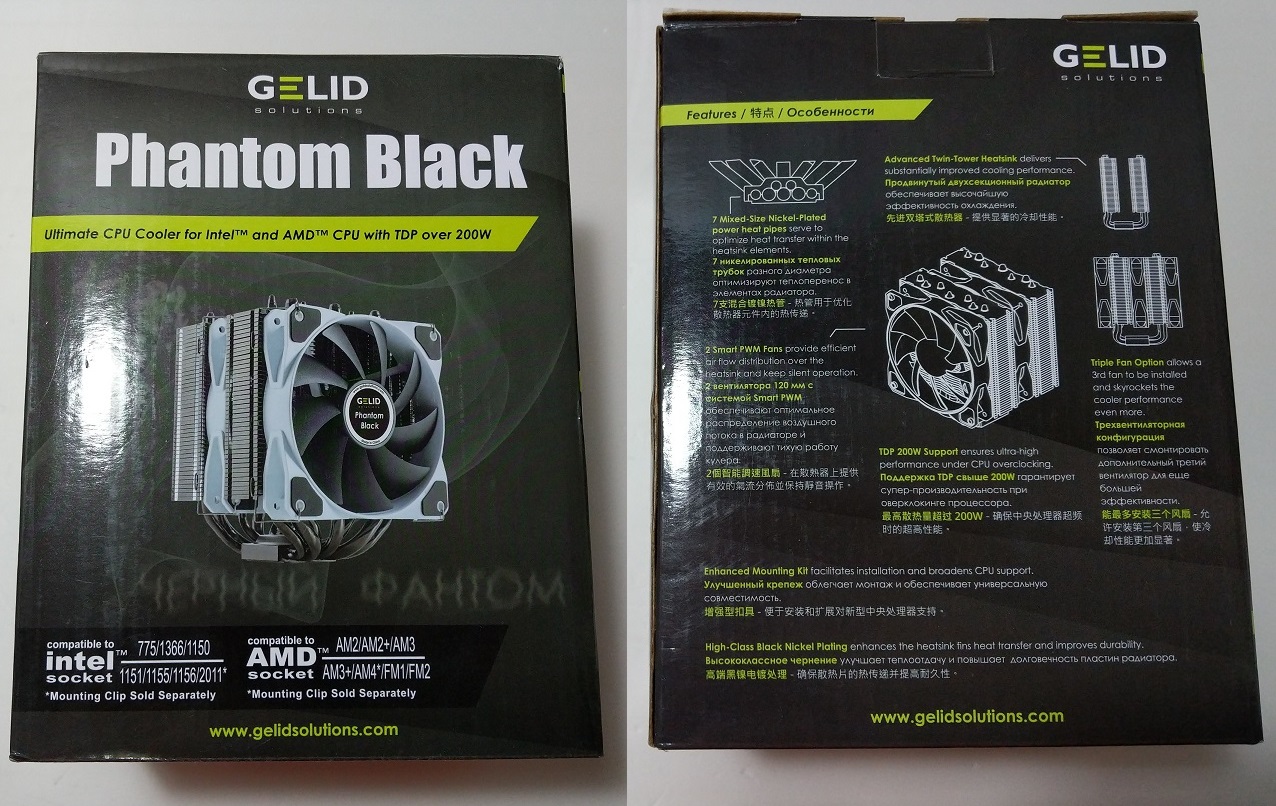
Same as the Phantom, the cooler is packed inside a cardboard box, mainly colored in black. At the front, you the “Phantom Black” model name on top and the compatible CPU sockets.

Brief descriptions of each feature of the cooler are printed at the back, such as the 7-heatpipe design and 200 watts TDP support.

GELID Phantom Black CPU Cooler

You can find the detailed specification lists on the sides. The Phantom Black CPU cooler supports most modern CPU platforms and sockets, like Intel LGA 1150/1151/1155/1156 and AMD AM4/AM3+/AM3.

GELID Phantom Black CPU Cooler

Two closed-cell foam are in place to keep the cooler protected. Additional plastic wrap is used to cover the heatsink.

GELID Phantom Black CPU Cooler

You get a user manual on how to install the cooler on various CPU sockets, as well as the corresponding mounting hardware. Two pair of fan mounting clips and a 4-pin PWM Y-cable are also included.

GELID Phantom Black CPU Cooler

GELID Phantom Black CPU Cooler

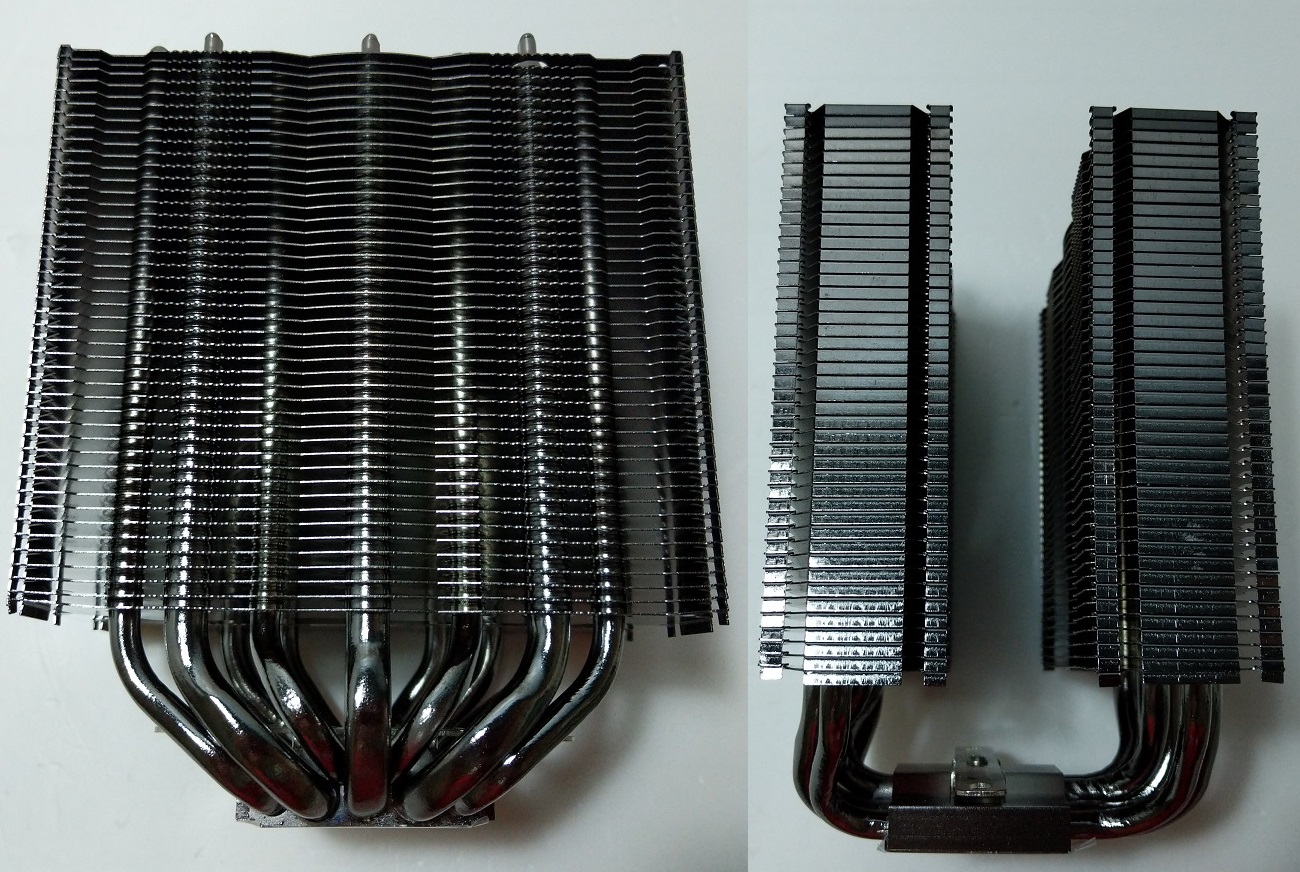
The Phantom Black is a large dual-tower CPU cooler, which can handle a more powerful processor. To transfer the heat evenly to the heatsink, there are a total of seven nickel-plated heatpipes.
GELID Phantom Black CPU Cooler

The whole heatsink fin stacks and heatpipes are both painted with high-gloss black nickel-plating, which looks really nice in person. The coating are evenly distributed.

One of the aluminum fin stacks is moved slightly towards the center for better motherboard and RAM compatibility.
GELID Phantom Black CPU Cooler

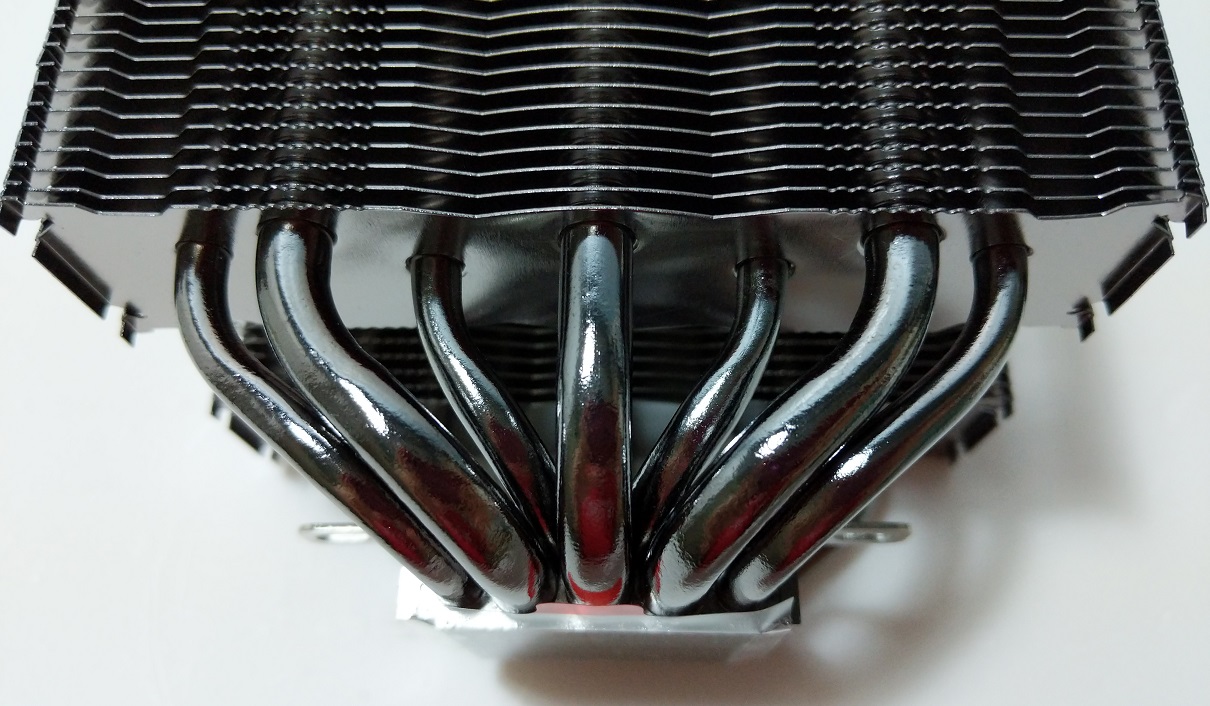
The Phantom Black has three 8 mm heatpipes and four 6 mm heatpipes. GELID says its heatpipes placement can help improve the efficiency of distributing heat to all heatpipes.
GELID Phantom Black CPU Cooler

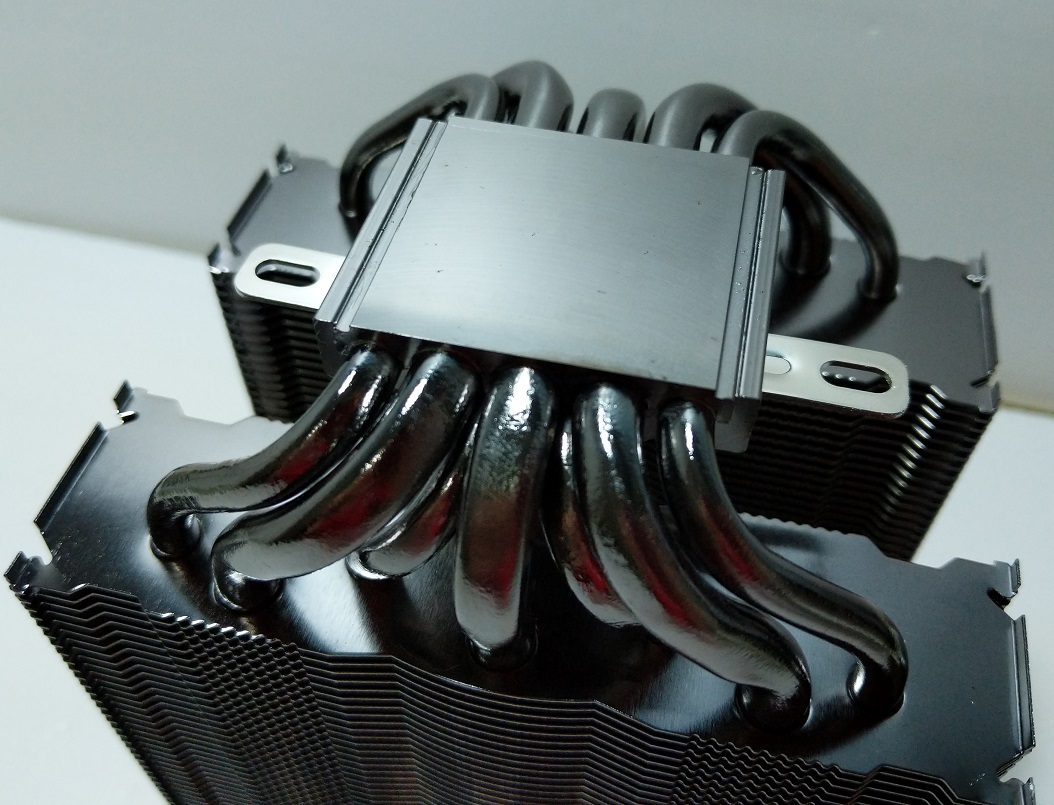
The copper base plate is also plated with nickel and polished to a mirror-like finish.

GELID Phantom Black CPU Cooler

Although the Phantom Black supports up to three 120 mm cooling fans, only two fans and their mounting clips are included. You will need to purchase the additional hardware separately.

The included 120 mm fans can be controlled via PWM, spinning from 750 RPM up to 1600 RPM. According to GELID, they have a rated MTBF of 50,000 hours. Different from the Phantom cooler, the fans have anti-vibration rubber pads on each corner to reduce noise.

Review

We have updated our CPU cooler tests to more reflect real-world cooling performance of coolers.

Testing Methodology

To find out how the cooler performs, a total of two benchmarks is included. AIDA64 is used to run a CPU stress test. CPU, FPU and system cache are all stressed to create as much heat output as possible. Also, Cinebench R15 is used to simulate real-world CPU load (like video-editing or rendering). It will be run continuously for three times. The highest CPU package temperatures are recorded. Ambient temperature is around 26°C.

Results will be taken at a 50% fan speed and 100% speed, controlled via the motherboard CPU PWM fan header. Both single-fan and dual-fan configurations of the cooler will be tested separately.

  • CPU: AMD Ryzen 5 1600X @ 3.6 GHz (95W TDP)
  • Motherboard: MSI B350M GAMING PRO (its review here)
Performance

GELID Phantom Black CPU Cooler

During the AIDA64 stress test, the Phantom Black cooler kept the CPU temperature at around 61°C with one fan in 50% speed. If the fan speed was increased to 100%, the temperature dropped drastically to only 56°C. The dual-fan, full speed configuration achieved the lowest temperature at 55°C as expected.

GELID Phantom Black CPU Cooler

In Cinebench R15, the CPU generally produces less heat than AIDA64 stress test, but the overall rankings of each configuration remained the same. The highest CPU temperature was lower at 58°C, while the lowest temperature sat at 53°C.

GELID Phantom Black CPU Cooler
All fans were running at full speed. Results were the temperature differences between the CPU and the ambient room.

When comparing the Phantom and Phantom Black coolers, the Phantom Black edged out slightly in all of our tests. The Phantom Black always raised the ambient room temperature by around 2°C to 3°C less than the Phantom.

Conclusion

Unboxing Treatment Recommendation

The GELID Phantom Black is a very capable CPU cooler, that is able to keep our Ryzen 5 1600X CPU cool at stock clock speed. Even if the CPU is overclocked, the Phantom Black should have no problem maintaining the temperature under 70°C. In our tests, the cooler performed slightly better than its brother, the Phantom (its review here).

The included 120 mm fan runs well enough to cool the heatsink. There are anti-vibration pads on each corners to reduce noise. At higher fan speed, the fan does generate some noticeable noise, but should be mostly dampened by a closed case panel.

The Phantom Black cooler will cost you $47.30 USD (MSRP), with a 5-year warranty. In my opinion, the $5 USD increase in price (against the Phantom) is well-justified by the cooler’s better nickel-plated glossy finish and more superior cooling performance.

You can purchase the cooler from your local/online resellers.

Thanks GELID Solutions Ltd. for providing us the Phantom Black Cooler for review. (Review Sample)

Feel free to leave comments below, if you have any opinion about this website. Share the website around if you enjoy reading it. Subscribe to our Newsletter or follow our Google+, Facebook and Twitter.

Support this website simply by shopping in Amazon. It will give us small kickbacks, if you use the above affiliate links to make any purchases, which will help us grow.

ASRock Phantom Gaming X Radeon RX580 8G OC Specifications

ASRock Phantom Gaming X Radeon RX580 8G OC
Overview
ManufacturerASRock
Model NamePHANTOM-GXR-RX580-8G-OC
MSRP$299.99 USD
Release DateMay 8th, 2018
Graphics Processing Unit
Micro-ArchitectureAMD Polaris GCN 4.0
Model No.Polaris 20
Fabrication Node14 nm FinFET
Stream Processors2304
Texture Mapping Units144
Render Output Units32
Compute Units36
Memory Specifications
Memory Size8 GB
Memory TypeGDDR5
Memory Bus256-bit
Memory Bandwidth256 GB/s
Clock Speeds
Base Clock1380 MHz
Memory Clock2000 MHz
Effective Memory Clock8000 MHz
Other Technical Specifications
InterfacePCI-Express 3.0 x16
Outputs3x DisplayPort 1.4, 1x HDMI 2.0b, 1x DVI-D
Power Connectors1x 8-pin
SLI/Crossfire Support4-way Crossfire
Height2-slot
Width12.678 cm, 4.99 inches
Length27.881 cm, 10.98 inches

NVIDIA GeForce RTX 2070 Founders Edition Specifications

NVIDIA GeForce RTX 2070 Founders Edition
Overview
ManufacturerNVIDIA
MSRP$599 USD
Release DateOctober 2018
Graphics Processing Unit
Micro-ArchitectureTuring
Model No.TU106
Fabrication NodeTSMC 12 nm
CUDA Cores2304
Texture Mapping Units144
Render Output Units64
SMPs36
Tensor Cores288
RT Cores36
Memory Specifications
Memory Size8 GB
Memory TypeGDDR6
Memory Bus256-bit
Memory Bandwidth448.0 GB/s
Clock Speeds
Base Clock1410 MHz
Boost Clock1710 MHz
Memory Clock1750 MHz
Effective Memory Clock14000 MHz
Other Technical Specifications
InterfacePCI-Express 3.0 x16
Outputs2x DisplayPort 1.4, 1x HDMI 2.0b, 1x USB Type-C, 1x DVI-D
Power Connectors1x 8-pin
TDP185 watts
Maximum Temperature89°C
Height2-slot
Width11.6 cm or 4.435 inches
Length22.86 cm or 9.0 inches

NVIDIA GeForce RTX 2080 Founders Edition Specifications

NVIDIA GeForce RTX 2080 Founders Edition
Overview
ManufacturerNVIDIA
MSRP$799 USD
Release DateSeptember 20th, 2018
Graphics Processing Unit
Micro-ArchitectureTuring
Model No.TU104-400
Fabrication Node12 nm
CUDA Cores2944
Texture Mapping Units184
Render Output Units64
SMPs46
Tensor Cores368
RT Cores46
Memory Specifications
Memory Size8 GB
Memory TypeGDDR6
Memory Bus256-bit
Memory Bandwidth448.0 GB/s
Clock Speeds
Base Clock1515 MHz
Boost Clock1800 MHz
Memory Clock1750 MHz
Effective Memory Clock14000 MHz
Other Technical Specifications
InterfacePCI-Express 3.0 x16
Outputs3x DisplayPort 1.4, 1x HDMI 2.0b, 1x USB Type-C
Power Connectors1x 6-pin + 1x 8-pin
TDP225 watts
Maximum Temperature88°C
SLI/Crossfire Support2-way SLI with NVLink
Height2-slot
Width11.57 cm, 4.556 inches
Length26.67 cm, 10.5 inches

NVIDIA GeForce RTX 2080 Ti Founders Edition Specifications

NVIDIA GeForce RTX 2080 Ti Founders Edition
Overview
ManufacturerNVIDIA
MSRP$1,199 USD
Release DateSeptember 20th, 2018
Graphics Processing Unit
Micro-ArchitectureTuring
Model No.TU102-300
Fabrication Node12 nm
CUDA Cores4352
Texture Mapping Units272
Render Output Units96
SMPs68
Tensor Cores544
RT Cores68
Memory Specifications
Memory Size11GB
Memory TypeGDDR6
Memory Bus352-bit
Memory Bandwidth616.0 GB/s
Clock Speeds
Base Clock1350 MHz
Boost Clock1635 MHz
Memory Clock1750 MHz
Effective Memory Clock14000 MHz
Other Technical Specifications
InterfacePCI-Express 3.0 x16
Outputs3x DisplayPort 1.4, 1x HDMI 2.0b, 1x USB Type-C
Power Connectors2x 8-pin
TDP260 watts
Maximum Temperature89°C
SLI/Crossfire Support2-way SLI with NVLink
Height2-slot
Width11.57 cm, 4.556 inches
Length26.67 cm, 10.5 inches

How to Install Windows on A Mac Using Boot Camp?

Install Windows on Mac with Boot Camp
Screen Capture from Apple

macOS is the desktop operating system developed and used by Apple’s computer, including MacBooks and iMacs. Although the OS has been constantly improved with different features added each year, there are still proprietary software and games that only available on Microsoft Windows. Therefore, Boot Camp exists to allow Mac users to enjoy advantages from both worlds by dual booting.


Boot Camp is pre-installed in every supported Mac computer (with Intel processor inside). It makes installing Windows much more easier, without the need to download any drivers or software yourself.

Basic Requirements for Boot Camp

  • MacBook Pro (2012 and later)
  • MacBook Air (2012 and later)
  • MacBook (2015 and later)
  • iMac Pro (2017)
  • iMac (2012 and later)
  • Mac mini (2012 and later)
  • Mac mini Server (Late 2012)
  • Mac Pro (Late 2013)

Before you start, you should open the Mac App Store to see if there is any system update available. Please update before continuing. You will also need a Microsoft Windows disk image (ISO), which can be downloaded from Microsoft’s website.

Installation Procedures

Install Windows on Mac with Boot Camp

After preparing the ISO image for Windows, you will need to open the Boot Camp Assistant to start the installation process. You can find the software in your application lists, or simply use Spotlight Search.

Install Windows on Mac with Boot Camp

It is recommended to first backup your disk before installing to prevent any data loss. In the assistant, you will have to choose the location of your Windows ISO image. Then, you can decide how much disk space is used for the Windows partition. You should consider the sizes of both the operating system and the applications you want to install later. For example, the minimum requirement for Windows 10 64-bit is 20 GB.

Install Windows on Mac with Boot Camp

Wait for the installation to finish. In the process, you may be asked to type in your administrator password on macOS.

Install Windows on Mac with Boot Camp

When the Boot Camp Assistant completes, the machine will be rebooted to the newly created partition. You will be greeted with the usual Windows installation screen.

  • Key in your Windows Product Key or skip by pressing “I don’t have a product key”
  • Select your desired operating system version (e.g. Windows 10 Home or Pro)
  • Click to install Windows on the partition labelled “BOOTCAMP”
  • Wait until the installation is finished

Install Windows on Mac with Boot Camp

The Boot Camp Installer will be prompted, once you are booted into Windows. It will help you install all necessary drivers for your device’s hardware.

Install Windows on Mac with Boot Camp

Finally, you can check if there are any updates required for Boot Camp or other drivers, such as Wi-Fi and trackpad.

Overall, installing Windows on a Mac computer with Boot Camp is not difficult. Most of the procedures are straightforward. It can be simplified into five main steps.

  • Download the Windows ISO Image
  • Open Boot Camp Assistant on macOS and create a partition
  • Install Windows on the partition
  • Install Boot Camp on Windows
  • Check if there are any software/driver updates

Feel free to leave comments below, if you have any opinion about this website. Share the website around if you enjoy reading it. Subscribe to our Newsletter or follow our Google+, Facebook and Twitter.

Support this website simply by shopping in Amazon. It will give us small kickbacks, if you use the above affiliate links to make any purchases, which will help us grow.

Apple macOS 10.14 Mojave Is Available to Download Now

Apple macOS 10.14 Mojave

The latest version of macOS (10.14), codenamed Mojave, was first announced at WWDC 2018 in June. Now, it is finally released for the public to download. This update does not have radical changes on the design, but focuses more on performance and features.


The most noticeable feature in macOS Mojave is the new “Dark Mode”, which changes the original white menu bar and Dock to either dark gray or black. This mode will work well when you are using the computer in low-light environment. All built-in applications support the mode out-of-the-box, while third-party apps may need updates to adopt it.

You can perform “Quick Actions” directly in Finder, without even opening an app. For example, you can quickly create a PDF, trim a video and edit a photo. Moreover, the default Screenshot utility is improved vastly. You can not only capture the whole screen or window, but also do a screen-recording.

Apple macOS 10.14 Mojave
Screen Capture from Apple

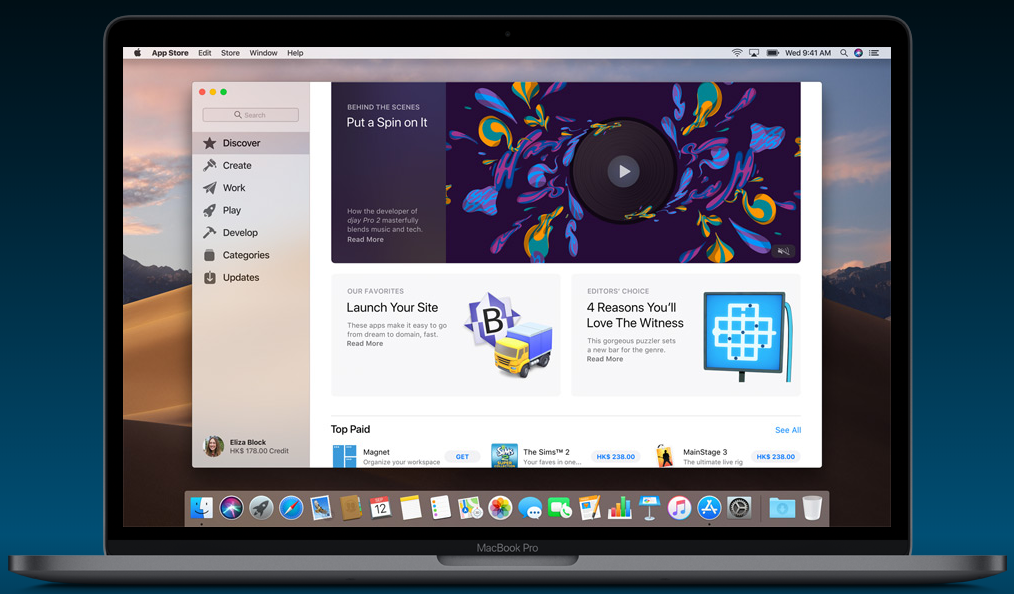
The Mac App Store gets a redesign with a new look and content, similar to the App Store in iOS. Apple News, Voice Memos, Home, and Stocks are the four new included first-party applications.

macOS Mojave should be compatible for most recently released MacBooks and iMacs.

  • Early 2015 MacBook or later
  • Mid 2012 MacBook Air or later
  • Mid 2012 MacBook Pro or later
  • Late 2012 Mac mini or later
  • Late 2012 iMac or later
  • All iMac Pro
  • Late 2013, Mid 2010 or Mid 2012 Mac Pro with a Metal-capable graphics card

You can download the update by either searching “macOS Mojave” in the Mac App Store, or go to Apple’s website and click “Upgrade Now”.

Feel free to leave comments below, if you have any opinion about this website. Share the website around if you enjoy reading it. Subscribe to our Newsletter or follow our Google+, Facebook and Twitter.

Support this website simply by shopping in Amazon. It will give us small kickbacks, if you use the above affiliate links to make any purchases, which will help us grow.

GIGABYTE Releases Its First PCIe NVMe M.2 SSDs

GIGABYTE PCIe NVMe M.2 SSD
Photo from GIGABYTE

We have previously reported GIGABYTE’s release of the 2.5-inch UD Pro SSDs. Based on the success of those drives, GIGABYTE now expands the lineup with its first PCIe NVMe M.2 SSDs, which provide better performance than traditional SATA SSDs.


The new M.2 drives will have three different capacities, including 128 GB, 256 GB and 512 GB. The 512 GB model will be shipping soon, while other models are already available for purchase. The 256 GB version can have sequential read and write speed at 1200 MB/s and 800 MB/s respectively; 128 GB has slightly slower performance at 1100 MB/s and 500 MB/s.

The drives use Toshiba 3D TLC NAND flash, paired with Phison PS5008-E8T controller. It supports NVMe 1.2 Protocol, and PCIe 3.0 x2 lanes for data transmission. The drives has a MTBF of 1.5 million hours and a 3-year warranty. The 128 GB and 256 GB models are rated for 100 TBW and 200 TBW respectively. No pricing information is provided at this time.

Feel free to leave comments below, if you have any opinion about this website. Share the website around if you enjoy reading it. Subscribe to our Newsletter or follow our Google+, Facebook and Twitter.

Support this website simply by shopping in Amazon. It will give us small kickbacks, if you use the above affiliate links to make any purchases, which will help us grow.

Follow Us on Social Media

583FansLike
635FollowersFollow
494FollowersFollow
1,494FollowersFollow
43SubscribersSubscribe

More Articles