As a Windows Mixed Reality (WMR) headset, the HP Reverb G2 may require some additional steps to be properly configured for SteamVR. Steam is one of the largest online store for VR games, with about 6000 VR-supported or VR-only games/applications on Steam at the moment.
Preparation
If you are first time setting up your Reverb G2 headset, you will have to get the Mixed Reality Portal from the Microsoft Store.
After that, you need to open the Steam Desktop application and log in with your Steam account. You can then download and install two software, “SteamVR” and “Windows Mixed Reality for SteamVR“. Please wait 15 to 30 minutes for the installation to complete.
Procedures
To start, you can now plug in the Reverb G2 headset into the computer. Please make sure the power cable, DisplayPort cable and USB Type-C cable are connected correctly. The HP logo on the front of the headset will light up, if it receives power.
The Mixed Reality Portal should automatically show up, after it detects the Reverb G2 headset. You can also manually open the portal via the start menu. You will be greeted by a setup wizard. It will run some tests to ensure compatiblity, as well as downloading some drivers at the background.
It can take up to 15 minutes for the portal to finish its first-time initialization. Another setup wizard with a HP Reverb G2 headset image will appear.
The wizard includes some brief descriptions about the headset and controllers. It will guide you through the controllers’ pairing process.
You will be asked to create a physical boundary for your VR environment. You can choose to draw a boundary at least 5 ft x 7 ft (~ 1.52 m x 2.13 m) large or no boundary for only seated or standing use. You can later change this setting in Mixed Reality Portal.
Depending on your personal perference, you can activate speech recognition for the Mixed Reality Portal and the headset. Please wait a few minutes for the application to finalize all the settings.
The Mixed Reality Portal should now show “Ready”, which means all the initial setup is completed. You can simply start playing your downloaded VR games in the Steam application. You can further optimize your VR experience for the HP Reverb G2 by adjusting the settings in both SteamVR and Mixed Reality Portal, such as resolution and refresh rate of the displays.
Feel free to leave comments below. Share the article if you enjoy reading it. Follow us on Twitter, Facebook, Instagram and Pinterest.
Support this website simply by shopping on Amazon and Newegg. We will receive small kickbacks, if the above affiliate links are used to make any purchases.
The HS80 RGB Wireless is the first gaming headset from Corsair, after rolling out the new minimalistic design language across the brand in late 2020. The HS80 features Corsair’s SLIPSTREAM technology and Dolby Atmos spatial audio.
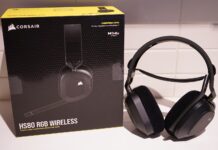
The HS80 is shipped inside a black cardboard box with yellow accent color. There are a couple photos of the headset to showcase the design. The short description and specification table are translated into four different langauges. The headset is compatible with Microsoft Windows, Apple macOS and Sony PlayStation 4/5. Our particular sample has a model number of CA-9011235-AP.
The actual HS80 headset sits securely in a plastic tray, while the accessories are separately placed underneath.
Aside from the usual quick start guide and warranty/safety information, you get a support card with instructions about how to use Dolby Atoms. A USB wireless receiver and a 1.8-meter USB Type-A to Type-C cable are also included.
Corsair HS80 RGB Wireless Gaming Headset
The HS80 is Corsair’s first time to use the floating headband design. The whole headset is mostly made from molded plastic, except from the aluminium hinges and top plate on the ear cups. A small section of the headset cable is exposed at the hinges. The ear cups can be rotated by 90 degrees, to lay flat around your neck or on the table.
The Corsair logo on each ear cup is the only RGB lighting zone for the HS80. The ear pad cushion is made from memory foam with breathable cloth fabric on top. When uncompressed, the padding is about 27 mm thick. The ear pads are user-replaceable, by twisting them outward.
All the buttons and ports are located on the left ear cup, including the USB Type-C charging port and power button. Next to the volume wheel is a status LED, which provides battery info by pulsing red, orange or green light.
Despite not having an adjustable outer headband, you can still alter the tension of the floating headband by the two velcro straps, depending on the size of your head. The padding is very thin and is covered with leatherette.
The microphone on the HS80 is not detachable, but can be swiveled upwards to mute and hide it. The arm can be bent to move the microphone closer to your mouth. There is a LED ring at the front, which will light up white if the microphone is recording, or red if the microphone is muted.
Using the HS80 wirelessly will require the included USB adapter to be plugged in. Audio data is transmitted via 2.4 GHz radio wave. Corsair claims it to have up to 60 feet or about 18.28 meters of range. The headset can also be used with a USB cable attached for higher quality 24-bit 96 KHz audio.
Review
Design
Because of the internal battery, the HS80 is on the heavy side, weighing in at around 368 grams. The ear pad cushion is fairly thick and supportive. I like the cloth fabric material on the ear pads, which has a softer touch to the skin than normal leatherette. I also found the HS80 fit better and more snuggly on my head than previous headsets from Corsair, such as the VOID RGB Elite Wireless. There is little to no stress/strain formed around the floating headband, even after a long gaming session.
Features
The HS80 headset supports both stereo and Dolby Atoms virtual surround sound. The Dolby Atoms for headphones software will normally cost $14.99 USD for a license after the 30-day free trial, but HS80 owners will be able to use the service for free. It has a rather immersive 3D effects for movies and videos with a widened, expanded sound stage. Dobly Atoms requires additional object-oriented information to provide accurate directional sound in compatible media and games. I would recommend using the standard stereo mode for non-supported games.
The SLIPSTREAM USB receiver can handle multiple wireless periperhals from Corsair at the same time with its multipoint feature. You only need one USB adapter for your wireless keyboard, mouse and headset, which is especially useful for laptops with limited USB ports.
Sound Quality
The HS80 is equipped with two 50 mm neodymium audio drivers, which have a reported response frequency from 20 Hz to 40000 Hz. Similar to most gaming headset, it generates a warmer sound profile. Emphasises on midrange and treble is low. Sound is detailed and without distortion, even at high volume. The bass is acceptable and punchy, but not to the degree of other HyperX headsets I tested in the past.
Probably due to the fabric top on the ear pads, the passive noise isolation is not as good as the HyperX Cloud II Wireless or Cloud Flight S. You may have to turn up the volume slightly higher, if you are in a noisy environment.
Microphone Quality
The omni-directional microphone can record outstanding audio, perfectly fine for voice chats and video calls. The voice does not sound muffled. The clarity is better than expected with very low compression and processing, unlike most wireless headsets, due to bandwidth constraint. It is a nice touch to have the ability to control the microphone sidetone volume in the iCUE software.
You can listen and compare to the various microphone samples here, from the gaming headsets we tested previously.
Wireless Range and Battery Life
The HS80 is advertised to have a maximum wireless range of 60 feet (about 18 meters). I was not able to test its range limit in my small apartment. However, its connection stayed strong, when the USB receiver was about 5 meters away with a couple thin walls/doors in between.
The HS80 is outfitted with a non-replaceable 5.55 wh (1500 mAh) lithium-ion ploymer battery. Corsair claims the headset to have about 20 hours of battery life. In my testing, a single charge could last about 2 to 3 days, with 5 to 7 hours of daily usage at 30% to 60% volume. RGB lighting was turned off. Charging to full battery will take approximately 2 to 3 hours, but you can still use the headset with the USB cable in wired mode.
Software and RGB Lighting
The HS80 can be configured using the iCUE 4 software. Our software version was 4.23.137, which has a download size of 886 MB. It took around 1.05 GB of storage space after installation.
At the home page, you can customize the Scenes and Sensors panels, and see all the connected Corsair devices. You will receive notification, if there is available firmware update.
The USB receiver will have its own configuration page, which can be used to activate the PlayStation or Multipoint features. When you click to pair additional devices to the receiver, a setup wizard will appear to guide you through the process.
For the HS80 headset, you can change the RGB lighting effects, colors and brightness. In the Equalizer tab, there are five EQ presets for different situations, such as Movie Theater and FPS Competition. You can also add and save your own equalizer settings. Microphone and sidetone volume can be adjusted on the left side, as well as the button to switch to surround sound mode. It would be great if iCUE can show actual percentage of the battery status.
As there is no internal memory in the headset, most iCUE settings are not saved and will be reverted to default, if the iCUE software is not running in the background or uninstalled. For whatever reasons, iCUE also overrides the audio settings in Windows, which switches the headset from 2-channel 24-bit 48000 Hz to 8-channel, despite not in the surround sound mode with Dolby Atmos. The sound then becomes muddy with some background noises. I had to close iCUE to maintain the correct 2-channel settings.
Conclusion
The Corsair HS80 RGB Wireless is an overall great headset with excellent sound performance and features. The new floating headband design improves dramatically over the previous VOID series headset on comfort and clamping force, at least on my head size. The inclusion of a Dolby Atoms license is great, if you want to experience one of the most immersive virtual surround sound for supported content. The microphone produces clear and superb sound for a wireless headset. Battery life is average at around 15 to 20 hours, with the RGB lighting turned off.
Thanks Corsair for providing us the headset for review. (Review Sample)
Feel free to leave comments below. Share the article if you enjoy reading it. Follow us on Twitter, Facebook, Instagram and Pinterest.
Support this website simply by shopping on Amazon and Newegg. We will receive small kickbacks, if the above affiliate links are used to make any purchases.
The Xtrfy M42 RGB is the second ultra-lightweight gaming mouse in the company’s Project 4 lineup. It has the same hardware combination as the original M4, but gets a different body shape.
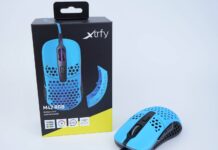
The black- and yellow-colored cardboard box is printed with a diagram showcasing the M42 mouse’s physical dimensions and shape. A list at the back displays all the other specifications, such as the weight, sensor and switches models.
You will get a quick start guide, a Xtrfy sticker and a set of replacement mouse feet in the box. Not only that, there are two extra special ABS keycaps (matching your mouse’s colorway) and a seperate top panel.
Xtrfy M42 RGB Gaming Mouse
The Xtrfy M42 has a symmetrical body with only one set of side buttons on the left side, for right-handed users. The mouse has a length of 118 mm, width of 64 mm and height of 38 mm. The weight is reduced to 59 grams, by cutting circular holes on the outer shell. Two medium-sized 100% pure PTFE feet can be seen at the bottom for smoother gliding. You can also add an additional feet around the sensor to keep it level for better tracking performance.
The top panel of the M42 is inter-changable, if you want to alter the position of the hump to fit your desired grip style. The panel just slaps into place and is secured by a tiny magnet.
The M42 maintains a roughly unchanged width across the whole length of its plastic body. With the default top panel, the hump is located towards the end of the mouse for palm support for claw grip users. On the other hand, the second top panel smooths out the hump drastically, which should be more suitable for fingertip grip users with less interference.
Xtrfy covered the internals with conformal coating to increase durablity from dust and accidental splashes. The main buttons of the M42 uses genuine Omron switches, that are rated for 20 million clicks.
The two side buttons are in good placement, that are easily reachable by the thumb. The back button is slightly bigger than the front one.
Identical to the M4, the M42 RGB is equipped with the EZcord USB cable, which has a ferrite core and gold-plated connector at the end. The paracord-like cable is 1.8 meter in length and is more flexible than traditional braided cable.
Review
Sensor
Like all wired versions of Xtrfy gaming mice, the PixArt PMW3389 is chosen as the optical sensor for the M42. It has a DPI range from 400 to 16000, 450 IPS and 50 G of acceleration. You can set the polling rate to 125 Hz (8 ms), 500 Hz (2 ms) or 1000 Hz (1 ms).
MouseTester V1.5.3 is used to test the CPI/DPI deviations. Most levels were within +1% to +3% of variations from the configured DPI settings. The largest difference was observed at 400 DPI with +14%, while the smallest one at 7200 DPI with +1.125%.
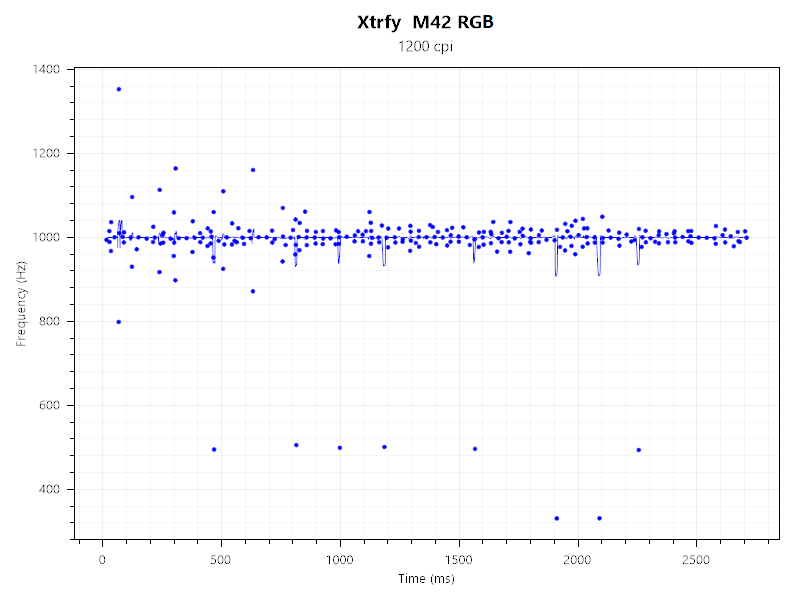
The M42’s polling rate spread between 800 Hz and 1200 Hz. There were some occational drops to 500 Hz, but they were not noticable when the mouse was in use.
User Experience
Since I have been using the Xtrfy MZ1 as the daily driver for the past couple months, I found the default top panel with the more significant hump at the back more comfortable to use. It offers a bit more palm support for my claw grip. The interchangable shell is held in place very securely with clips and magnet, despite not having a screw. Tracking is accurate and predictable as expected, without experiencing hardware acceleration or jitter.
The main buttons are responsive with little pre- and post-travel. The Omron switches feel to have a firmer click and slightly higher actuation force than the Kailh 8.0 switches on the MZ1. The included EZcord USB cable is fine, but is not on par with the compeititon. It is stiffer and thicker than the upgraded EZcord Pro.
Software
There is no customization software for the M42 mouse. All the configurations are controlled via a series of buttons combinations and switches. For example, pressing the dedicated DPI button will cycle you through the eight DPI levels, with a corresponding LED color. You can also change the RGB lighting effects, brightness and speed by clicking the button behind the scroll wheel + the main/side buttons.
RGB Lighting
The RGB lighting is coming from the LED light bar at the front and side, as well as the Xtrfy logo inside. It is bright and colorful with smooth transition animation.
Conclusion
The Xtrfy M42 is a great ultra-lightweight gaming mouse with solid tracking performance and satisfying main button switches. Having the ability to swap the top shell is exceptionally smart, which you can adjust the body shape for a more comfortable grip. I am not suprised to see Xtrfy incorporating this feature into its entire wireless mouse lineup.
The M42 costs $59.00 USD to $69.00 USD (MSRP), depending on the colorways. All models are provided with a 1-year warranty. Compared to other popular choices in the market, the Endgame Gear XM1r and Glorious Model O/O- cost $49.99 USD (MSRP). The XM1r gets a newer PAW3370 sensor and more durable Kailh 8.0 switches, while the Model O/O- uses the PMW3360 sensor. The XM1r and Model O are physically larger with heavier weights (59 grams vs 70 grams vs 65 grams).
You can purchase the mouse from your local/online retailers or the links below from Amazon or Newegg.
Thanks Xtrfy for providing us the mouse for review. (Review Sample)
Feel free to leave comments below. Share the article if you enjoy reading it. Follow us on Twitter, Facebook, Instagram and Pinterest.
Support this website simply by shopping on Amazon and Newegg. We will receive small kickbacks, if the above affiliate links are used to make any purchases.