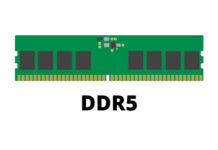
The DDR5 SDRAM standard was released by the JEDEC in July 2020. It was until Intel launched its 12th Generation (Alder Lake) Core processors, that mainstream consumers started to adapt the new technoloy in November 2021. AMD is also slated to exclusively support DDR5 memory in its upcoming Zen 4 (Ryzen 7000) platform. It will be the primary memory standard for most computers in the next half a decade.
Do not confuse DDR5 with GDDR5, which is mainly used for graphics cards’ video memory buffer and is actually based on the older DDR3 standard.
Higher Transfer Rate and Density
DDR4
DDR5
Transfer Rate
1600 – 3200 MT/s
4800 – 8400 MT/s
Theoratical Bandwidth
25.6 GB/s
67.2 GB/s
Chip Density
up to 16 Gb
up to 64 Gb
Capacity per DIMM
up to 64 GB
up to 256 GB
Channel per DIMM
1
2
On-die ECC
No
Yes
Base Voltage
1.2 Volt
1.1 Volt
Like every new generation of memory standard, DDR5 improves significantly on the performance and density of the RAM modules. The default JEDEC specification is set at 4800 MT/s (equals to bandwidth of 38.4 GB/s), which is already 50% faster than the original DDR4’s 3200 MT/s. According to Micron and SK hynix, DDR5 RAM can potentially increase to have up to 8400 MT/s with 67.2 GB/s of bandwidth, when the technology matures in the near future.
The single 80-bit (64-bit for non-ECC) channel per DIMM is separated into two independent 40-bit channels with expanded16-byte burst length, which allows the DDR5 RAM to deliever two sets of data to the CPU simultaneously. This can reduce latency, boost efficiency and ultilization.
Memory chips can now be 64 Gb in size, which enables each DIMM to have a maximum capacity of 256 GB, 4 times larger than in DDR4. On-die ECC (Error Correction Code) is availiable on DDR5 to provide more data reliablity for the higher-density chips.
Onboard Power Management IC (PMIC)
DDR5 modules will operate at 1.1 V by default, instead of 1.2 V, to reduce power consumption. More voltage will be needed, if you are overclocking the RAM beyond the default JEDEC frequency (DDR5-4800). The power management circuitary and controller for DDR5 is moved from the motherboard onto the RAM module itself for better signal integrity. They are responsible for converting the 5 V from the power supply to the required voltage of the memory chips. This can result in less complex and cheaper motherboards, but consumers will still have to pay the cost for the possibly more expensive DDR5 DIMMs.
Intel XMP 3.0 Support
Alongside its 12th Gen processors, Intel also rolls out the latest version of its eXtreme Memory Profile or XMP for DDR5 RAM. It is used to apply settings (voltage, frequency and timings) to run your memory at the advertised speed from most manufacturers. With XMP 3.0, the larger 384 bytes onboard storage lets the RAM module keep up to five total profiles, which two of them can be rewritable by the users.
Feel free to leave comments below. Share the article if you enjoy reading it. Follow us on Twitter, Facebook, Instagram and Pinterest.
Support this website simply by shopping on Amazon and Newegg. We will receive small kickbacks, if the above affiliate links are used to make any purchases.
In January 2021, Xtrfy collaborated with the famous mouse reviewer, Rocket Jump Ninja, and created the new MZ1 RGB “Zy’s Rail” gaming mouse. The design is said to be based on his years of experiences in playing games and testing over 100 mice.
Unboxing
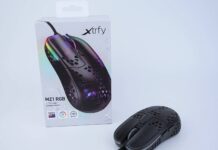
The MZ1 comes in a familar cardboard box from other Xtrfy gaming mouse. There are pictures showing the shape and dimensions of the mouse, as well as the hardware specifications (e.g. weight, sensor and switch models).
Apart from the usual quick start guide and Xtrfy sticker, there is another Thank you letter from Rocket Jump Ninja and an extra set of replacement mouse feet. However, no special ABS keycaps are provided in the box for the MZ1.
Xtrfy MZ1 RGB Gaming Mouse
Despite having a very symmetrical body shape (the left side panel does contour inwards for the thumb), the Xtrfy MZ1 is designed to be used by right-handed users. It is a relatively small gaming mouse with a shorter length at 111 mm, width at 58.5 mm and height at 36.5 mm. The weight is brought down to just 56 grams by the circular-hole outer shell design. By default, there are three 100% pure PTFE feet at the bottom for smooth gliding. You can add an extra mouse feet around the sensor to keep it more level, which is included in the set of replacement feet.
The MZ1’s body is made from black transluscent plastic. A RGB light bar spans across the front and the sides. The hump of the mouse is at the very back for palm support. The U-shaped main buttons are longer than usual, stopping at the middle of the body. With the shorter length and lower height, the MZ1 is most suitable for fingertip and claw grip users.
The printed circuit board (PCB) inside the mouse has conformal coating to increase durability against dust and splashes. It is also interesting to note Xtrfy does not put holes in some key areas of the body panels, where your hand makes contact with the mouse and your fingers can rest on. The MZ1 uses the Kailh GM 8.0 switches for the main buttons, which is rated for 80 million clicks.
The two side buttons are located behind the LED light bar, which have the same frosted plastic texture as another surfaces on the MZ1. Both buttons are equal in size and easy-to-reach with the thumb.
The MZ1 is equipped with the new EZcord Pro USB cable, which Xtrfy claims it to be even softer and flexible than the EZcord used on the M4 and M42 mice. The paracord-like cable is 1.8 meter in length with a ferrite core and a gold-plated connector.
Review
Sensor
The MZ1 is outfitted with a PixArt PMW3389 optical sensor, which is capable of having DPI range from 400 to 16000, 450 IPS and 50 G of acceleration. The polling rate can be set to 125 Hz (8 ms), 500 Hz (2 ms) or 1000 Hz (1 ms).
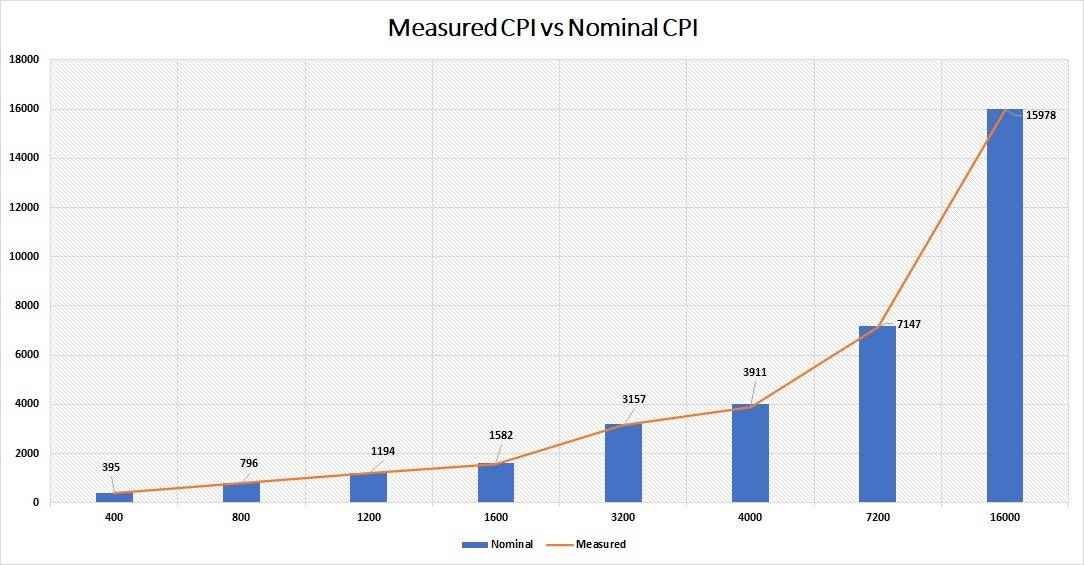
Tested with the Mouse Tester v1.5.3, the measured CPI/DPI levels for the MZ1 had very small deviations. The largest difference is at 4000 DPI with -2.23%, while the least is at 16000 DPI with -0.138%. The sensor did great between 400 DPI and 1600 DPI (-0.5% to -1.25%), which should be the most common range normal users will be using.
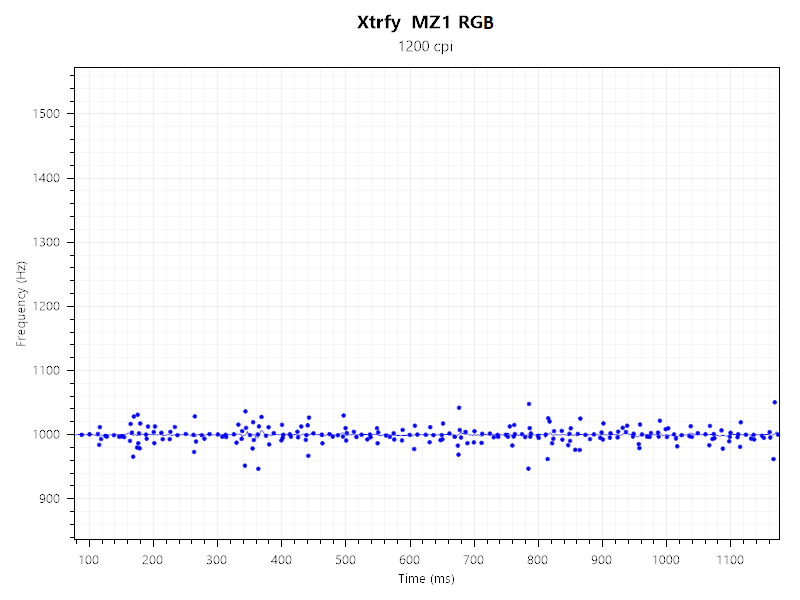
The MZ1 was able to maintain an exceptionally stable polling rate. There were no massive spikes or drops in frequency. All data points were recorded within +/-100 Hz of the intended 1000 Hz.
User Experience
Switching from the Pulsefire Haste, it took me a few days to get used to the unique shape of the MZ1 mouse. You will have to adjust your grip to accomodate the shorter body. I found myself having more control of the mouse in flicks, thanks to the extremely light weight (~56 grams) and grip styles (fingertip or claw). Some may think the MZ1 is a bit off-balance towards the front, but mine feels perfectly balance, which might subject to your particular hand size and grip. Overall, the mouse is comfortable to use with accurate tracking and no hardware acceleration.
The main buttons are shaped with a deep groove to provide more control for the index and middle fingers. The Kailh 8.0 switches have tactile clicks, as well as little pre- and post-travel. It feels less firm and requires less force to actuate than the Kailh 4.0 in the XM1 RGB. Despite having a longer main buttons, the actuation force is pretty even across the whole length. In my particular sample, the left main button is slightly loose and can have a tiny amount of wobble laterally, which is not happening on the right button.
The scroll wheel is quiet with distinct steps. The side buttons are enjoyable to use. They have more post-travel than pre-travel. The new EZcord Pro cable is a small improvement over the original EZcord, which is marginally less stiff and thinner.
Software
Xtrfy maintains the no-software approach for the MZ1 mouse, which all configuartions are handled by the onboard buttons and switches. It saves you from installing different software for each peripheral. You can set the DPI/CPI to eight levels by pressing the DPI button. Adjusting the switch at the bottom will change how the button behind the scroll wheel behave. It can be used to control the RGB effects, polling rate, lift-off distance (1 mm or 2.5 mm), main button debounce delay (2 ms to 12 ms) and even act as a F11 button.
RGB Lighting
Aside from RGB effects (e.g. Rainbow, breathing and solid color), you can configure the speed, color and brightness of the RGB lighting. There are three lighting “zones”, the LED light bar, scroll wheel and Xtrfy logo. The lighting looks really good through the frosted mouse’s outer shell.
Conclusion
The Xtrfy MZ1 is a unusual gaming mouse with a very distinctive shape. Users may take some time to get accustomed to the design and different grip style, but they will likely gain better movement control with the mouse. All buttons feel great to press with nice feedback. The PMW3389 sensor still tracks accurately and consistently, although not being the latest top-of-the-line sensor from PixArt anymore.
The MZ1 is priced at $69.00 USD (MSRP) with a 1-year warranty. It is about $10 USD to $20 USD more expensive than the Xtrfy M4 or M42, depending on the colorways. Compared to the competition, the Glorious Model O/O- and HyperX Pulsefire Haste cost $49.99 USD (MSRP), but they are equipped with different sensors (PMW3360 and PAW3335) and have a more traditional symmetrical shape. The MZ1 also has the lightest weight out of the three mice (56 grams vs 67/58 grams vs 59 grams).
You can purchase the mouse from your local/online retailers or the links below from Amazon or Newegg.
Thanks Xtrfy for providing us the mouse for review. (Review Sample)
Feel free to leave comments below. Share the article if you enjoy reading it. Follow us on Twitter, Facebook, Instagram and Pinterest.
Support this website simply by shopping on Amazon and Newegg. We will receive small kickbacks, if the above affiliate links are used to make any purchases. Or you can directly donate to us via our Buy Me a Coffee page.
Kingston released the XS2000 in September 2021, which is their first external SSD with support to the USB 3.2 Gen 2×2 interface at 20 Gbps. Its very compact physical size and IP55 water and dust resistant rating should make it suitable for transferring data on-the-go.
The particular XS2000 sample we got is the 1 TB model (SXS2000/1000G). Capacity ranges from 500 GB to 2 TB. It is advertised to have sequential read/write speeds of up to 2000 MB/s, thanks to the USB 3.2 Gen 2×2 interface. No MTBF or endurance information (TBW) is disclosed officially by Kingston. All models are provided with a 5-year warranty.
Unboxing
The XS2000 is transported in a white cardboard box. There is a cutout at the back showing the actual drive’s sticker with the model and serial number. All the compatible operating systems and USB versions are displayed in a table.
All contents in the box are placed securely in a plastic tray. You will get the black rubber sleeve/bumper case for drop protection, and a short 30 cm USB Type-C to Type-C cable.
Kingston XS2000 External SSD
The XS2000 has a really small physical footprint for portability. The silver aluminium and plastic enclosure is 69.54 mm long, 32.58 mm wide and 13.5 mm thick, which is even tinier than the Rocket Nano Rugged we tested previously.
Onboard the XS2000 is the Silicon MotionSM2320 memory controller and Micron’s 96-Layer 3D TLC NAND Flash with no DRAM cache. Unlike most external SSD, there is no additional USB bridge controller (commonly from ASMedia or JMicron), as the SM2320 is able to integrate both logics into a single chip design. This can help save some precious internal space and power consumption.
The XS2000 is certified for IP55 water and dust resistant. This means the SSD can survive in quite dusty environments and water jets/flows from all angles (splash-proof). However, it is not protected against submersion of water at any depth. With the included rubber sleeve, Kingston claimed the XS2000 to be shockproof, but it is not backed up by any certification, such as the MIL-STD-810G.
Next to the USB port is the activity LED for users to quickly check the status of the drive. The single USB Type-C port on the XS2000 supports the USB 3.2 Gen 2×2 standard, which has a maximum theoretical bandwidth of up to 20 Gbps or around 2500 MB/s.
Review
Testing Methodology
To test the performance of the solid-state drive, we use four well-established storage benchmarking software. They are CrystalDiskMark, ATTO Disk Benchmark, AS SSD Benchmark, as well as HD Tune Pro.
CrystalDiskMark can measure both sequential and random 4KB read/write speeds with a queue depth of 32. ATTO Disk Benchmark can test how the drive performs across different transfer block sizes, mostly in a sequential environment. AS SSD Benchmark can provide both normal read/write speed and the IOPS performance of the drive. HD Tune Pro can be used to simulate a large file transfer of up to 100 GB.
We also recorded the time to copy three files of 10 GB, 500 MB and 250 MB from a RAM disk to the SSD, to simulate a real-world situation.
In CrystalDiskMark, the XS2000 was able to reach sequential read/write speeds at about 1980 MB/s and 1740 MB/s respectively. Speeds dropped to around 177 MB/s and 202 MB/s when in random 4K operations at queue depth 32.
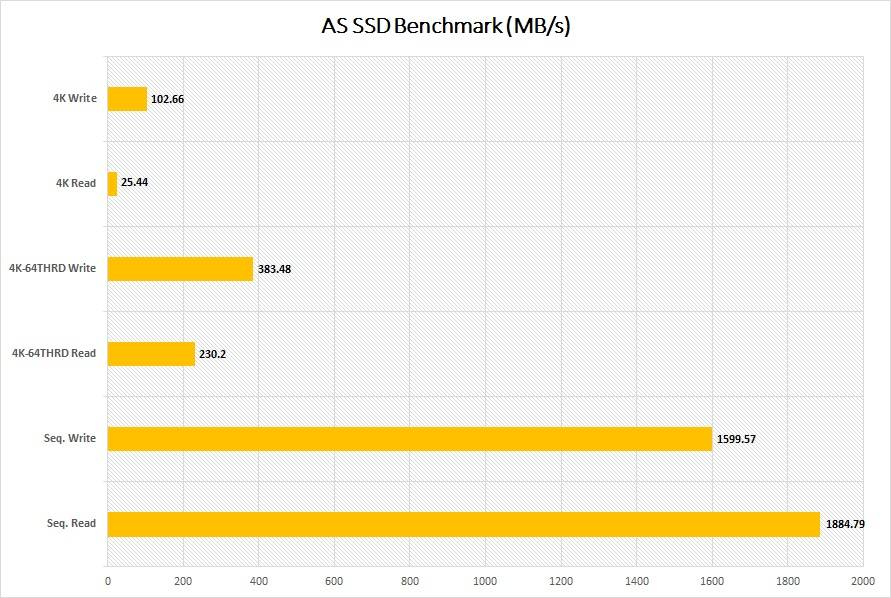
In AS SSD Benchmark, the sequential read/write speeds were a bit slower than those in CrystalDiskMark, at around 1880 MB/s and 1590 MB/s. Increasing queue depth to 64 pushed the random 4K performance up to 230 MB/s and 383 MB/s.
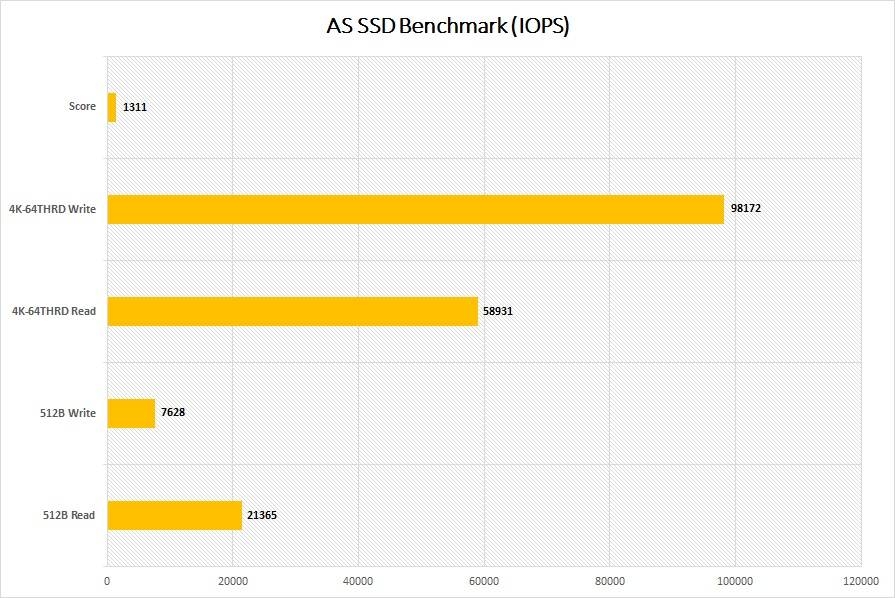
IOPS number represents how well a drive handles random input and output operations. The XS2000 achieved 58931 IOPS for read and 98172 IOPS for write. It scored 1311 in the test.
The read/write speeds improved as the test files became larger in ATTO Disk Benchmark. It stablized at around 1.96 GB/s in read and 1.76 GB/s in write, after the size hit 256 KB.
HD Tune Pro is used to simulate a large 100 GB file transfer. Around 96 GB (~10%) of the total capacity in the XS2000 is used as the pseudo-SLC cache. Write speed was maintained at about 1750 MB/s before the cache was saturated, which was then dropped to only about 200 MB/s.
It took the XS2000 around 12.83 seconds to complete the copy of three files, sized approximately 15 GB. Write speed peaked at about 1.07 GB/s to 1.1 GB/s in the process.
Comparison
The Kingston XS2000 was able to match the performance of the SilverStone MS12 SSD enclosure, except for slightly lower sequential write speeds. As expected, the read/write speeds were a lot faster than most external SSDs, because of the USB 3.2 Gen2x2 interface.
Conclusion
The Kingston XS2000 is an excellent portable SSD with compact size and top-of-the-line performance. At all our benchmarks, it managed to hit sequential read/write speeds at over 1700 MB/s. You will need to ensure your motherboard or laptop to have a compatible USB 3.2 Gen2x2 port to make the most of the available performance. You may need to purchase a separate PCIe expansion card, like the SilverStone ECU06, to the system. The IP55 water and dust resistant rating and the included rubber sleeve are great added bonuses for more durability.
The Kingston XS2000 costs around $159.99 USD (MSRP) for the 1 TB model, with a 5-year warranty. There are still limited shopping options in the market for USB 3.2 Gen 2×2 (20 Gbps) external SSDs. The XS2000 is priced relatively affordable for a reputable manufacturer. For comparsion, the SanDisk Extreme PRO and Seagate FireCuda Gaming SSD are on sale for $189.99 USD and $219.99 USD (MSRP) for 1 TB at the moment of this review. Both of them are physically bigger than the XS2000, and the Seagate one lacks IP55 certification.
The 500 GB and 2 TB versions of the XS2000 are priced at $99.99 USD and $284.99 USD (MSRP).
You can purchase the SSD from your local/online retailers or the links below from Amazon and Newegg.
Thanks Kingston for providing us the SSD for review. (Review Sample)
Feel free to leave comments below. Share the article if you enjoy reading it. Follow us on Twitter, Facebook, Instagram and Pinterest.
Support this website simply by shopping on Amazon and Newegg. We will receive small kickbacks, if the above affiliate links are used to make any purchases. Or you can directly donate to us via our Buy Me a Coffee page.
The Hydrogon D120 ARGB is the first product in the new Hydrogon series of CPU air coolers, launched in January 2021 by SilverStone. It is a dual-tower cooler with two 120 mm RGB cooling fans.
The Hydrogon D120 ARGB (SST-HYD120-ARGB) is shipped in a large cardboard box, with the typical SilverStone blue and white theme. The sides of the box are printed with short descriptions of the cooler’s features and supported RGB software.
You can also find a specification list on the box with information, like heatsink’s physical dimensions, weight and the fans’ RPM range.
Apart from all the mounting hardware, there are a user manual, a L-shaped screwdriver and a small tube of thermal paste. The Hydrogon D120 ARGB can be installed on most modern motherboards and CPU platforms, such as AMD AM4 and Intel LGA 1200/1700/2066 sockets. You may need to purchase an upgrade kit separately from SilverStone, if you purchased an older version of the cooler before the LGA 1700 socket launched in Q4 2021.
SilverStone Hydrogon D120 ARGB CPU Cooler
The heatsink of the Hydrogon D120 ARGB is 153 mm tall, 125 mm wide, and 87 mm deep. The two separate aluminum heatsink fin stacks are connected by six 6 mm nickel-plated copper heatpipes. The heatpipes on one side are bent slightly inwards with a shorter fin stack to provide more clearance for RAM modules and PCIe devices.
The machined CPU contact base (38 mm x 44 mm) is also plated with nickel, and has a mirror finish.
The two included cooling fans have a model number of CC12025H12S. According to SilverStone, they are equipped with hydraulic bearing, that have a rated MTBF of around 35,000 hours. They can spin from 0 RPM to 1850 RPM, controlled via a 4-pin PWM header. The nine curved blade design can generate about 56.23 CFM of airflow and 1.98 mmH2O of static pressure. There are some anti-vibration pads at the corners to dampen the noise.
To find out how the cooler performs, a total of three benchmarks are included. AIDA64 is used to run a CPU stress test. CPU, FPU and system cache are all stressed to create as much heat output as possible. Also, Cinebench R15 and Cinebench R20 are used to simulate real-world CPU load (like video-editing or rendering). It will be run continuously for three times. Ambient temperature is around 21°C.
Results will be taken at a 50% and 100% fan speed, controlled via the motherboard CPU PWM header. Stress test will run for at least 15 minutes. Once the CPU has reached the equilibrium temperature, we will record both the average and highest temperatures of the CPU package/hottest core with HWiNFO in the next 5 minutes.
The ambient temperature was hovering around 19°C to 22°C. In AIDA64, the Hydrogon D120 ARGB could manage the CPU temperature under 80°C. The package and hottest core was at 72°C (~1850 RPM) and 78°C (~1050 RPM) respectively. We did not observe any thermal throttling during the benchmarks.
The cooler kept the CPU temperature at 75°C at 50% PWM fan speed in Cinebench R15. Pushing the fan speed to 100% resulted in a 2°C improvement, at 73°C.
We saw the same 2°C lower CPU temperature when the fans were running at 100% in Cinebench R20. The hottest core dropped even further to 72°C, compared to the package temp at 75°C.
Comparison
The Hydrogon D120 ARGB’s cooling performance sits between the Noctua NH-U12S redux and CRYORIG R5. It has about 2.3°C to 2.4°C lower temperature differences than the NH-U12S redux, and about 1.5°C to 1.9°C higher than the R5 in AIDA64 and Cinebench R15. In Cinebench R20, the two coolers beat the Hydrogon D120 by 0.6°C to 5.4°C.
Conclusion
The SilverStone Hydrogon D120 ARGB was able to perform slightly better than some single-tower air coolers in some situations, because of its larger heatsink area. However, it has to sacrifice its size to gain only marginally-better cooling results. I would expect it to show a more substantial performance difference, as a dual-tower cooler. Memory and PCIe slot compatibility is great, thanks to the asymmetrical heatsink design. The included RGB lighting on the two fans is a nice addition for users to customize the look of their PC builds.
The Hydrogon D120 ARGB costs $49.99 USD (MSRP) with a 2-year warranty. The price is very similar to the Noctua NH-U12S redux at $49.90 (MSRP). The Hydrogon D120 is equipped with two ARGB fans, but has a shorter warranty period (2-year vs 6-year). It can be a decent option, if you want the extra RGB lighting and intend to run the processor at stock frequency.
You can purchase the cooler from your local/online retailers or the links below from Amazon and Newegg.
Thanks SilverStone for providing us the cooler for review. (Review Sample)
Feel free to leave comments below. Share the article if you enjoy reading it. Follow us on Twitter, Facebook, Instagram and Pinterest.
Support this website simply by shopping on Amazon and Newegg. We will receive small kickbacks, if the above affiliate links are used to make any purchases.