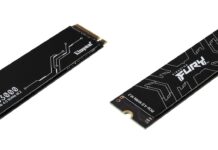
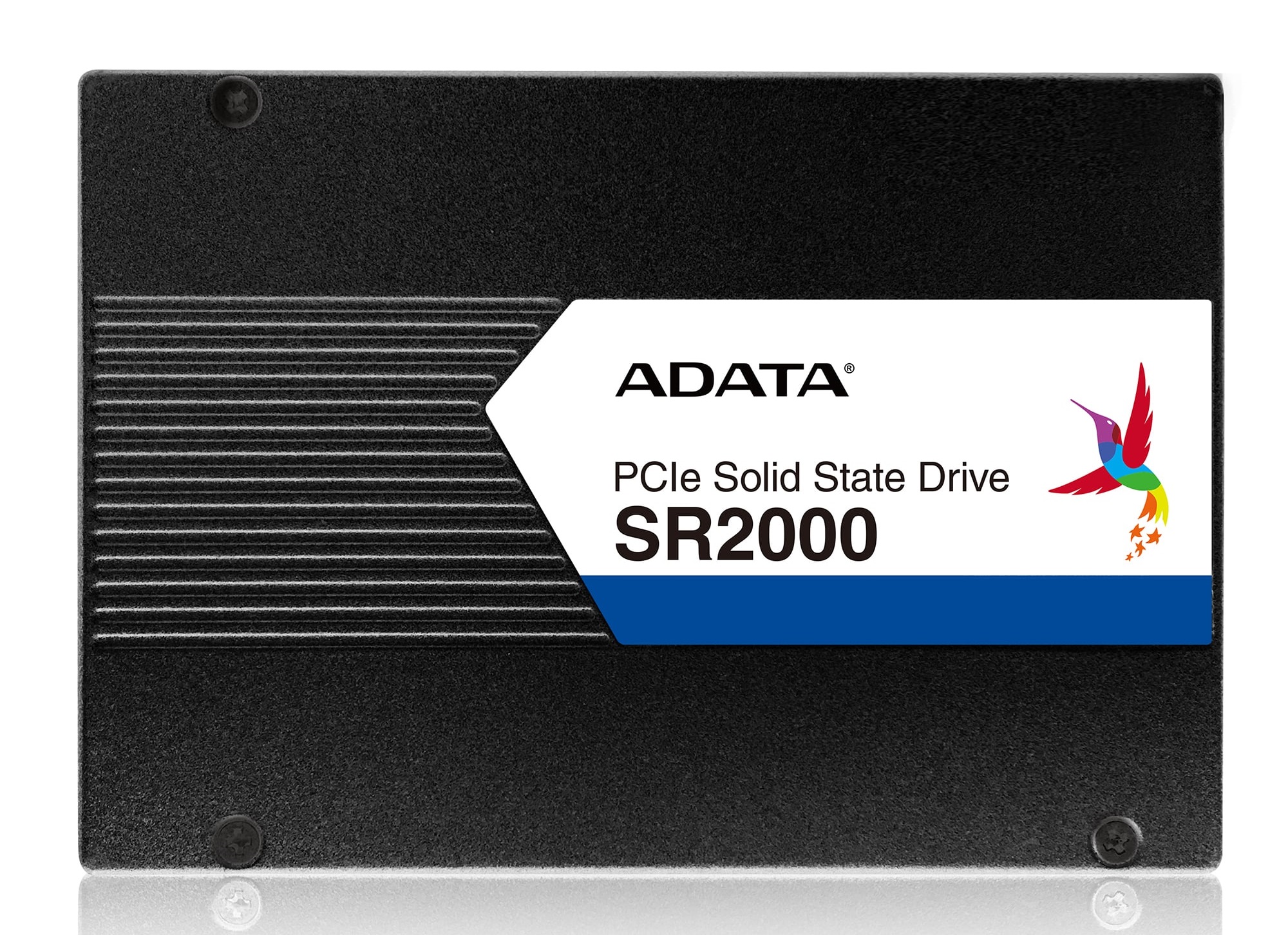
Recently, ADATA introduced a new enterprise SSD lineup, called SR2000, which will use 3D enterprise TLC (eTLC) NAND flash technology. The adoption of new 3D NAND flash makes solid-state drives to have better durability and higher capacity density.
There will be a total of two models in the SR2000 series. The first one is in a more traditional form factor. The SR2000SP will be a 2.5-inch SSD with a U.2 PCIe 3.0 x4 interface. The drive will be capable of having sequential read and write speeds up to 3.5 GB/s. Random read and write performance is also impressive, with up to 830,000 IOPS and 140,000 IOPS for read and write respectively. It will have capacity up to 11 TB.
SR2000SP
The second model, SR2000CP, is a PCIe add-in-card, running through a PCIe 3.0 x8 lane. It will have sequential read and write speeds at up to 6 GB/s and 3.8 GB/s, and unbelievable amounts of 1,000,000 IOPS and 150,000 IOPS for read and write respectively. The largest capacity is also at 11 TB.
Both SSDs support technologies like TRIM, AES 256-bit encryption and S.M.A.R.T. The drives are reliable for enterprises with a MTBF of about 2,000,000 hours. For more information, you can visit ADATA’s website and product pages.
Feel free to leave comments below, if you have any opinion about this website. Share the website around if you enjoy reading it. Subscribe to our Newsletter or follow our Google+, Facebook and Twitter.
Support this website simply by shopping in Amazon. It will give us small kickbacks, if you use the above affiliate links to make any purchases, which will help us grow.
Today, the SD Association announced the next generation SD 7.0 specification, as well as a new memory card standard. Both transfer speed and capacity will get a considerable improvement.
A new standard called SD Express is introduced, which allows the the current SD interface to use PCIe interface and NVMe protocol to transfer data. This change offers a maximum throughput of up to 985 MB/s, which is even higher than a SATA SSD. The increase in speed will let users to handle raw images and high resolution videos (4K and 8K) more easily and efficiently.
On the other hand, SD Ultra Capacity (SDUC) memory card is also announced with maximum capacity of up to 128 TB. Previous SDXC card can only store data up to 2 TB, 64 times less than the new SDUC card.
All new SD and microSD cards will remain the full backwards compatibility, in case the device does not support the new SD 7.0 specification. The new SD Express standard will be available on SDXC, SDUC and SDHC cards.
Feel free to leave comments below, if you have any opinion about this website. Share the website around if you enjoy reading it. Subscribe to our Newsletter or follow our Google+, Facebook and Twitter.
Support this website simply by shopping in Amazon. It will give us small kickbacks, if you use the above affiliate links to make any purchases, which will help us grow.
Dedication to performance and quality is what we come to expect from Noctua. And after over 4.5 years of development, the NF-A12x25 fans finally became the reality in May 2018. The reputable NF-F12 and NF-S12A have already set a high standard for other manufacturers to beat. Now, with tighter build tolerances, stronger frame material and more, can the NF-A12x25 be the best cooling fan in the market?
Specifications
Unboxing
The NF-A12x25 fans have three versions, PWM, FLX and ULN. The PWM version means the fan will be connected via a 4-pin fan header and controlled via Pulse Width Modulation by the motherboard BIOS or software. The FLX and ULN versions will have a 3-pin header and controlled via DC voltages, but the ULN runs at lower RPM for quieter operation.
The packaging of the new NF-A12x25 is the same as the other premium fans from Noctua. A box is colored in signature Noctua brown. The front shows the few key features of the fan, as well as the model name and version. There are short descriptions in 7 different languages with the specifications and package content lists at the back.
There are two flaps that can be opened. The one on the front have a small plastic window, letting you to have a glimpse on the new fan. On the left is a PQ diagram, which highlights the NF-A12x25’s all-round performance.
The back flap keeps all the features and their descriptions, such as SSO2 bearing and AAO frame.
Opening the box, the NF-A12x25 fan and the accessories are neatly packed inside a plastic tray. A welcome letter/quick start guide is also included.
There are tiny differences in accessories between the three versions of fans. Generally, the following are included.
Low-Noise Adaptor (L.N.A.)
A 4-pin y-cable
A 30 cm extension cable
4x NA-AV2 anti-vibration mounts
Anti-vibration gasket for water cooling radiators
4x Fan screws
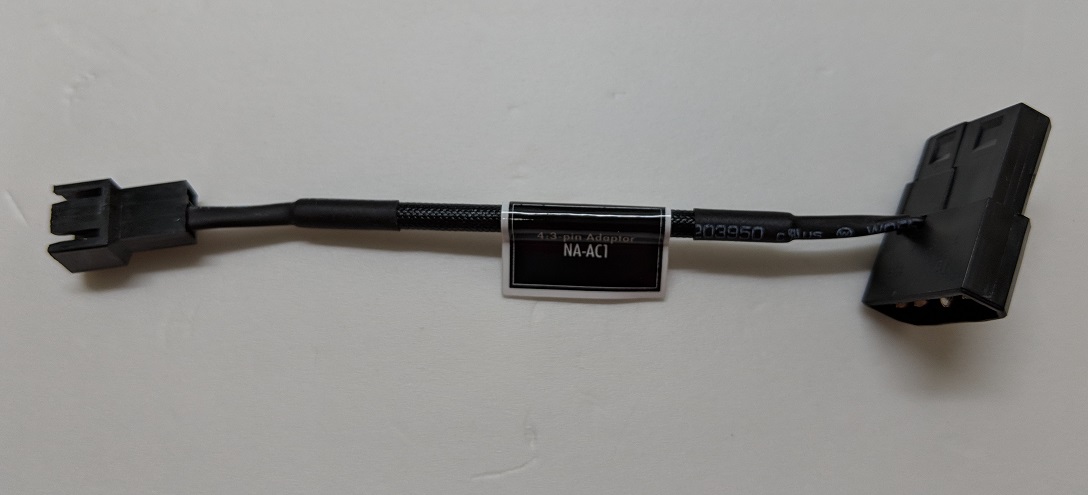
For FLX and ULN versions, an additional Ultra-Low-Noise Adaptor (U.L.N.A.) and a 3:4-pin (molex) power supply adaptor are included in the box.
Noctua NF-A12x25 Fan
The NF-A12x25 is a 120 mm cooling fan with a thickness of 25 mm.
The fan itself does not look much different from other previous Noctua fans. The beige and brown color scheme are here to stay apparently. However, a lot have changed and improved in the internals of the NF-A12x25.
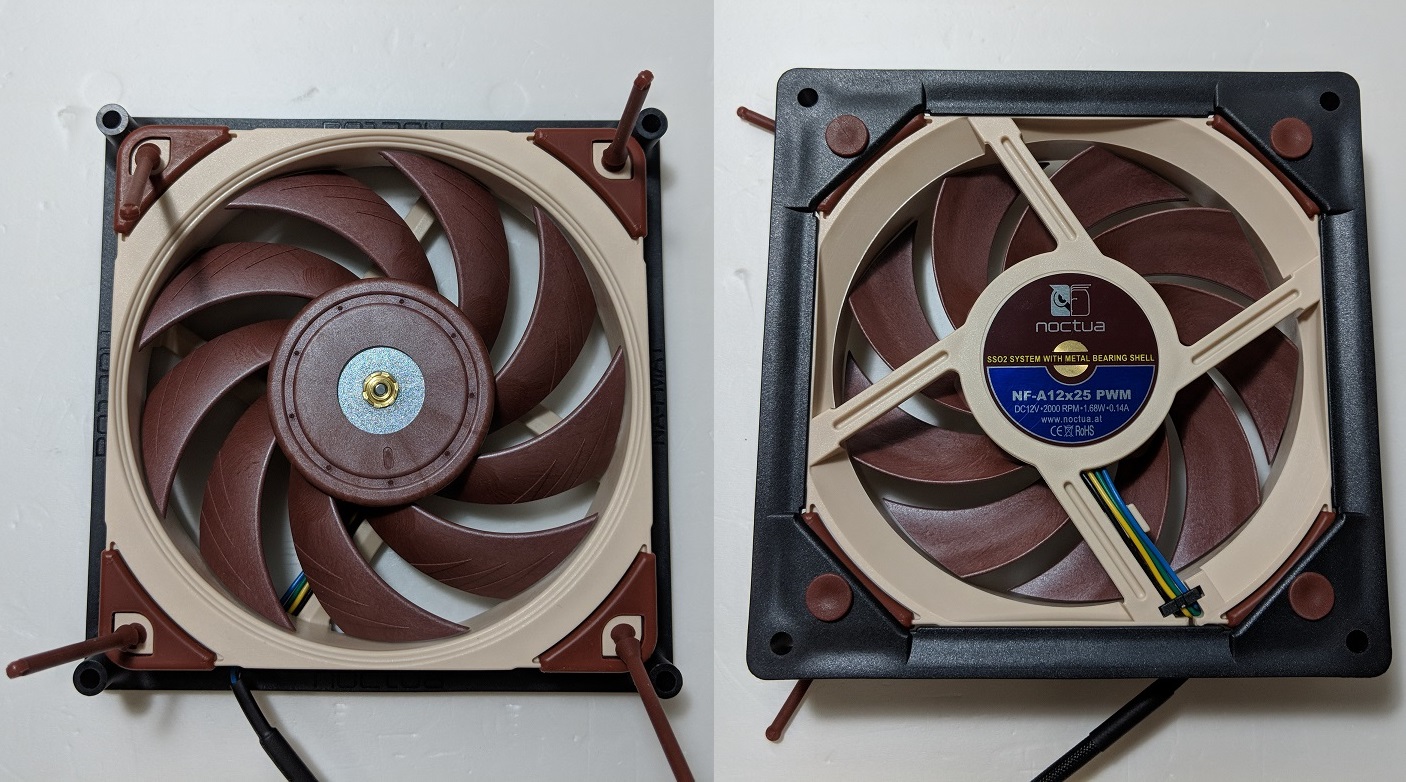
At the front, you will see the nine curved fan blades with flow acceleration channels on the surfaces. The blades are slightly narrower than the static pressure optimized NF-F12 (its review here). The AAO frame is made from a new compound called Sterrox Liquid-Crystal Polymer (LCP), instead of the traditional PBT. LCP like Kevlar, which has much higher tensile strength, is used to make bullet-proof vests.
NF-A12x25 (Left) vs NF-F12 (Right)
The increased rigidity and better chemical properties of the LCP enable Noctua to reduce impeller creep and have tighter build tolerances. Thanks to this, the NF-A12x25 has a stunning 0.5 mm tip clearance (blade to inner frame distance), which should allow less air to escape and generate higher static pressure. For reference, other fans have tip clearance ranging from 1 mm to 4 mm.
The motor hub of the NF-A12x25 is also larger than normal. The fan uses the SSO2 bearing with a steel-reinforced hub, which should provide better stability and lower noise.
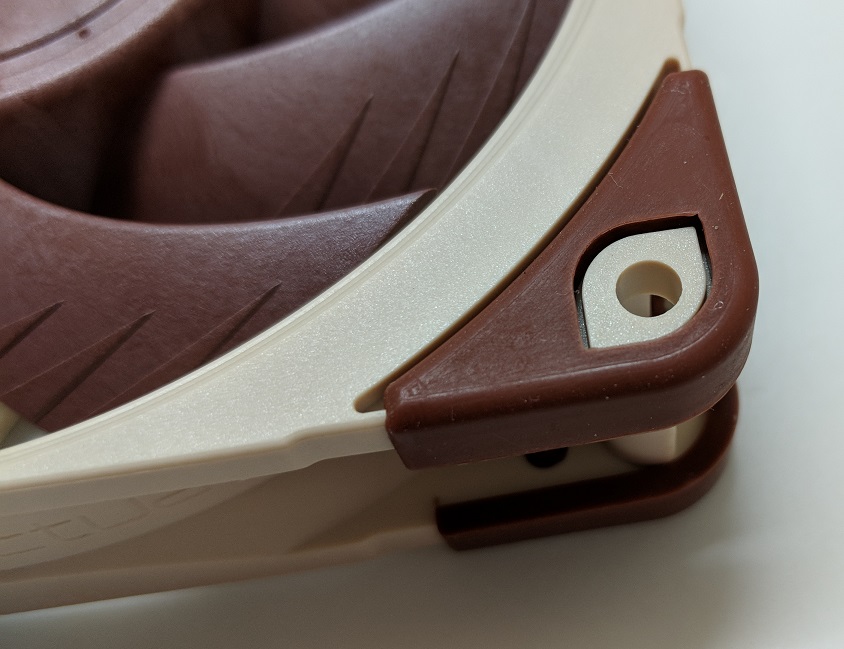
Both sides of the fan have anti-vibration rubber mount on each corner. Additional mounts for an extra fan are also included.
To further reduce the noise and air leakage, you can install the anit-vibration gasket when using the fan on liquid-cooling radiator.
NA-SFMA1 Mounting Apdator
Currently, the NF-A12x25 does not have a larger 140 mm variant. Therefore, Noctua has released the NA-SFMA1 mounting adapter (its review here), that can let the 120 mm fan to be installed on a 140 mm mounting spot on either radiators or PC cases.
Inside the package, there are two of the mounting brackets, along with a total of 8 NA-SAV4 anti-vibration mounts.
Each side of the adapter has a slightly extended edge to prevent air from escaping between the radiator, the adapter and the fan. Although the NA-SFMA1 is designed with the NF-A12x25 in mind, it should be compatible with other 120 mm fans without any issues.
Review
Testing Methodology
To determine the performance of the fan, we will measure both the airflow and CPU temperatures when using in heatsink, as well as its sound levels.
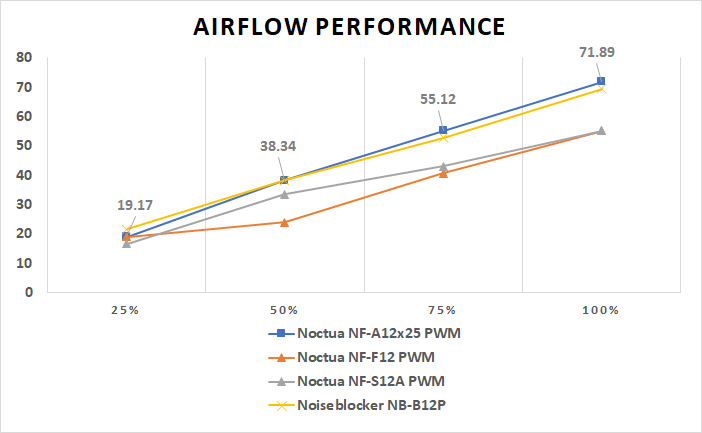
An anemometer is used to record the fan’s airflow in various RPM ranges, including 25%, 50%, 75% and 100%. The results are measured in CFM (cubic feet per minute). The distance between the anemometer and the fan is kept at around 5 cm.
A decibel/sound level meter is also used to measure the fan’s operating noise at 1000 RPM, 50% and 100% fan speeds. Results are shown as dbA. Distance between the decibel meter and the fan is maintained at around 10 cm. Ambient sound level is at around 35 dbA.
The fan is then installed on the air cooler. The CPU, FPU and system cache are stressed using AIDA64. Ambient temperature is around 26°C. The temperature of the CPU package is recorded at full load when the fan is running at full speed.
The NF-A12x25 did the best out of all our tested fans in the airflow test. It outperformed even Noctua’s own NF-F12 and NF-S12A, producing as much airflow as their maximum output at just 75% PWM speed (55.12 CFM). The fan can also generate a 19% better maximum airflow than advertised, at 71.89 CFM.
[visualizer id=”3571″]
The fan’s static pressure determines how well the air can pass through a restricted area, such as heatsinks and radiators. Different designs of the fan blades are required to optimize for either airflow or static pressure.
Every fan in this test could maintain the CPU package temperature at 31°C when idle. The NH-U12S cooler’s (its review here) default fan, the NF-F12, managed to keep the temperature difference at load at 25.6°C, which is the forth best result in the test. At full speed, the NF-A12x25 could lower the ΔT to 22.5°C, outperforming all other fans.
[visualizer id=”3779″]
Again, the NF-A12x25 could keep its motor spinning silently at all RPM ranges, thanks to the SSO2 bearing. At 1000 RPM, we measured the noise at a mere 39.7 dbA, which is about 14.4% better than the NF-F12 and 2.93% lower than the Noiseblocker B12-P.
For reference, the maximum speeds of NF-A12x25, NF-F12 and NF-S12A are 2000 RPM, 1500 RPM and 1200 RPM respectively.
Conclusion
The Noctua NF-A12x25 is undoubtedly the most powerful cooling fan in current Noctua’s 120 mm lineup, and one of the best in the market. I personally do not mind the beige and brown color scheme as long as the performance is great, but a chromax edition with black blades and frame is also a welcome addition though.
All the new technologies and materials that Noctua put in to the NF-A12x25 do help improve the performance and durability. The fan’s construction is top-notch, the frame feels super solid without any flex. Because of the blade design and the 0.5 mm tip clearance, the fan becomes a impressive all-rounder, which is suitable for both case ventilation and heatsinks/radiators cooling.
To sum up, the NF-A12x25 would not disappoint you in terms of performance. The fan has a MTBF of over 150,000 hours, which is a couple times longer than competitors. Backed with the 6-year warranty, the fan for sure will last for a long time. Each version of the NF-A12x25 costs the same $29.99 USD (MSRP), while the NA-SFMA1 mounting adapter is $11.99 USD (MSRP). For the amount of accessories, build quality and cooling abilities, the fan should be a no-brainer.
You can purchase the fans from your local/online resellers or the links below from Amazon.
Thanks Noctua for providing us the NF-A12x25 fans for review. (Review Sample)
Feel free to leave comments below, if you have any opinion about this website. Share the website around if you enjoy reading it. Subscribe to our Newsletter or follow our Google+, Facebook and Twitter.
Support this website simply by shopping in Amazon. It will give us small kickbacks, if you use the above affiliate links to make any purchases, which will help us grow.
Yesterday, Google finally released the ability of texting with Android Messages for web. It makes managing, reading and replying multiple messages for users much easier and quicker. You can choose to use it either on your smartphone or on your computer/tablet.
To use the Android Messages on the web, you would of course need a Android smartphone with the latest version of Messages on it. On the other end, your computer is required to have Google Chrome, Mozilla Firefox, Safari, or Microsoft Edge browser installed. Internet Explorer is not supported. Both devices will have to connected to the Internet through Wi-Fi or mobile data.
The following procedures are pretty similar to WhatsApp Web or WhatsApp Desktop.
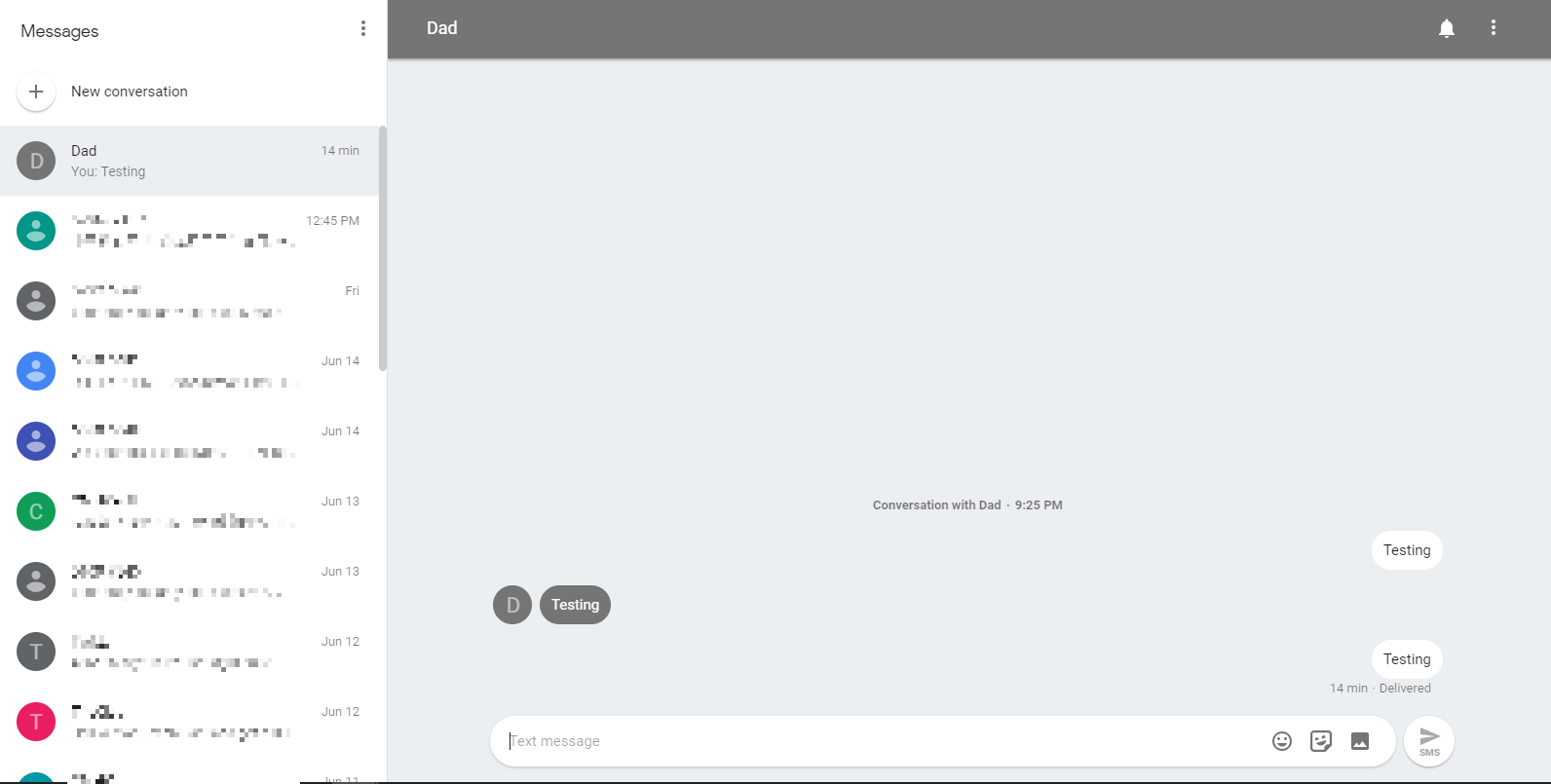
On the computer, visit messages.android.com. You will see a huge QR code and some instructions appearing on the web page.
Open the Android Messages app on your phone. Click the “More Option” button (the icon with three dots) on the top right corner. A “Message for Web” should be there in the expanded menu, if the update has rolled out to you.
Scan the QR code with your phone’s camera. And enjoy texting on your computer.
Remember to sign out, if using a public computer.
Your conversation threads, contacts, and settings are encrypted and cached on your browser, but the actual text conversations are not.
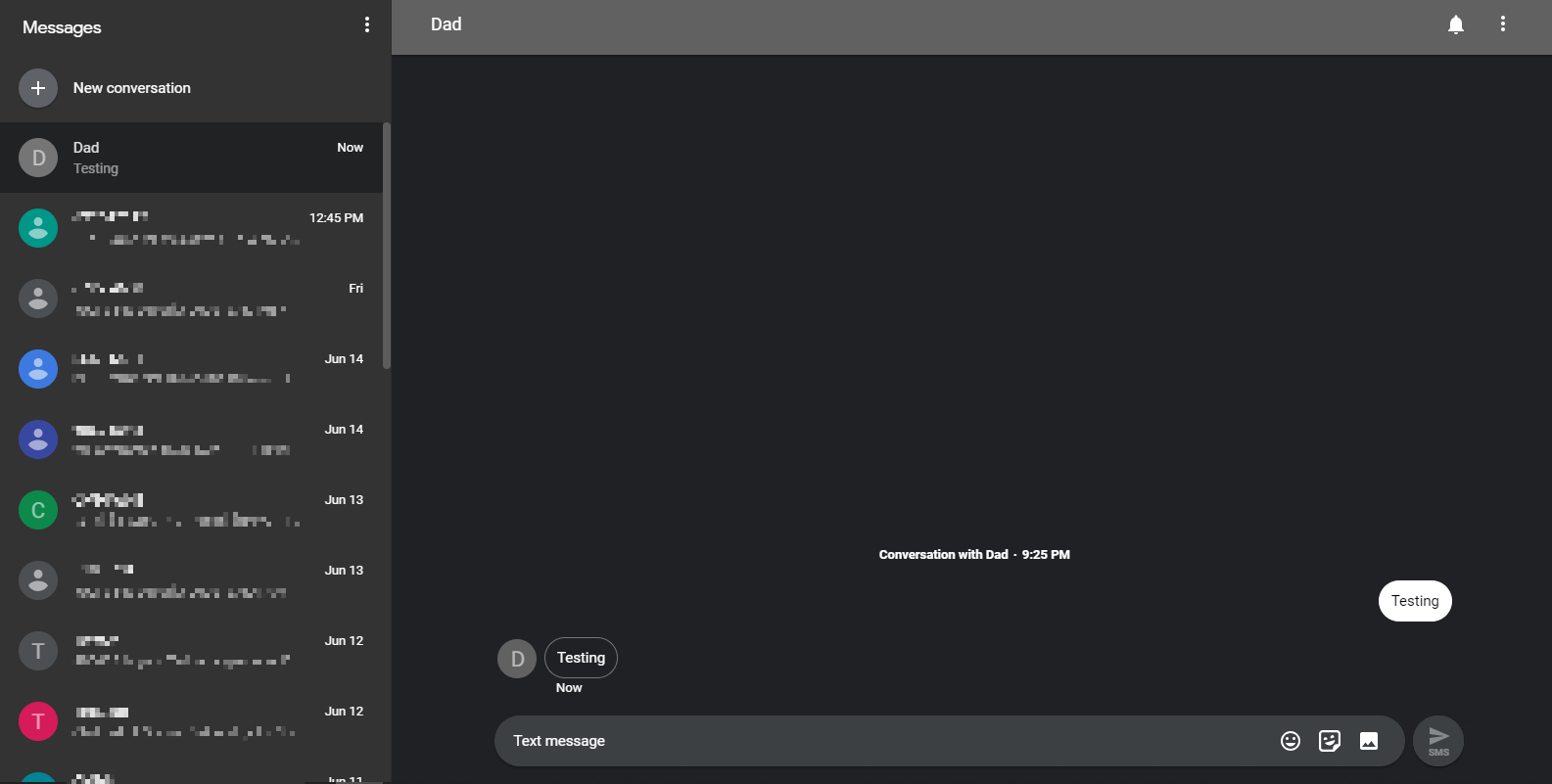
The Android Messages for web has other features such as a dark mode, and a high-contrast mode. You can emoji, stickers and images over the Internet. Your smartphone will need to stay powered on in order to properly send out messages.
You can also revoke access from your Android Messages app. All signed-in computers will be shown over here.
Feel free to leave comments below, if you have any opinion about this website. Share the website around if you enjoy reading it. Subscribe to our Newsletter or follow our Google+, Facebook and Twitter.
Support this website simply by shopping in Amazon. It will give us small kickbacks, if you use the above affiliate links to make any purchases, which will help us grow.
Both Intel and AMD had announced their next generation HEDT processors during the events in Computex 2018. Now, more information about the upcoming 32-core Threadripper CPU has been revealed, which is expected to arrive in Q3 2018.
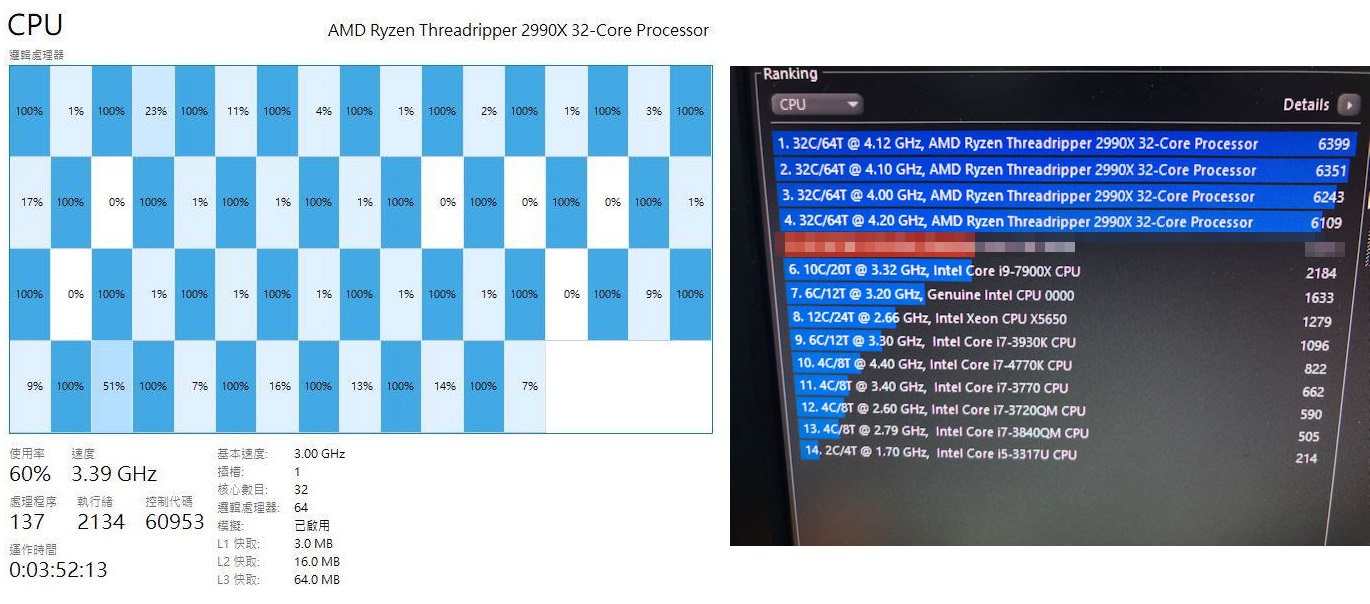
HKEPC, a well-established Hong Kong tech website, had got some exclusive details about the new Threadripper CPU. The processor will be named the “Ryzen Threadripper 2990X”. As we expected before, the 2990X will be using the improved Zen+ micro-architecture and manufactured by GlobalFoundries’s 12 nm process. The CPU will be B2 stepping, with 32 cores and 64 threads. It will be equipped with 3 MB of L1, 16 MB of L2 and 64 MB of L3 cache. The default TDP is 250W (180W for the 1950X).
For clock speed, the Threadripper 2990X will have a base clock of 3.0 GHz and a boost clock of 3.4 GHz or up to 4.0 GHz with Precision Boost on all cores. Because of the XFR 2 support, the CPU core can be clocked higher at 4.2 GHz for single-threaded workload. It seems AMD can still maintain the same if not better frequency as the 1950X for the 2990X, even the core count has been doubled to 32.
According to HKEPC, the Threadripper 2990X managed to overclock to 4.12 GHz on all 32 cores, using a Corsair H150i PRO all-in-one liquid cooler. The CPU voltage was set to 1.38 V. The overclocked 2990X was able to complete the Cinebench R15 test and achieved an impressive score of up to 6399.
For reference, Intel’s 28-core processor can score 7334 at 5 GHz, but at this clock speed, the CPU is cooled by a refrigerated liquid cooling loop, that is both impractical for average users and consumes a whopping amount of electricity.
Feel free to leave comments below, if you have any opinion about this website. Share the website around if you enjoy reading it. Subscribe to our Newsletter or follow our Google+, Facebook and Twitter.
Support this website simply by shopping in Amazon. It will give us small kickbacks, if you use the above affiliate links to make any purchases, which will help us grow.
Back in April 2018, AMD officially launched its 2nd generation Ryzen processors, but only the high-end 6-core and 8-core CPUs. The entry-level processors are not released at the same time. Those will be aiming towards the mainstream gamers with a budget-friendly price tag.
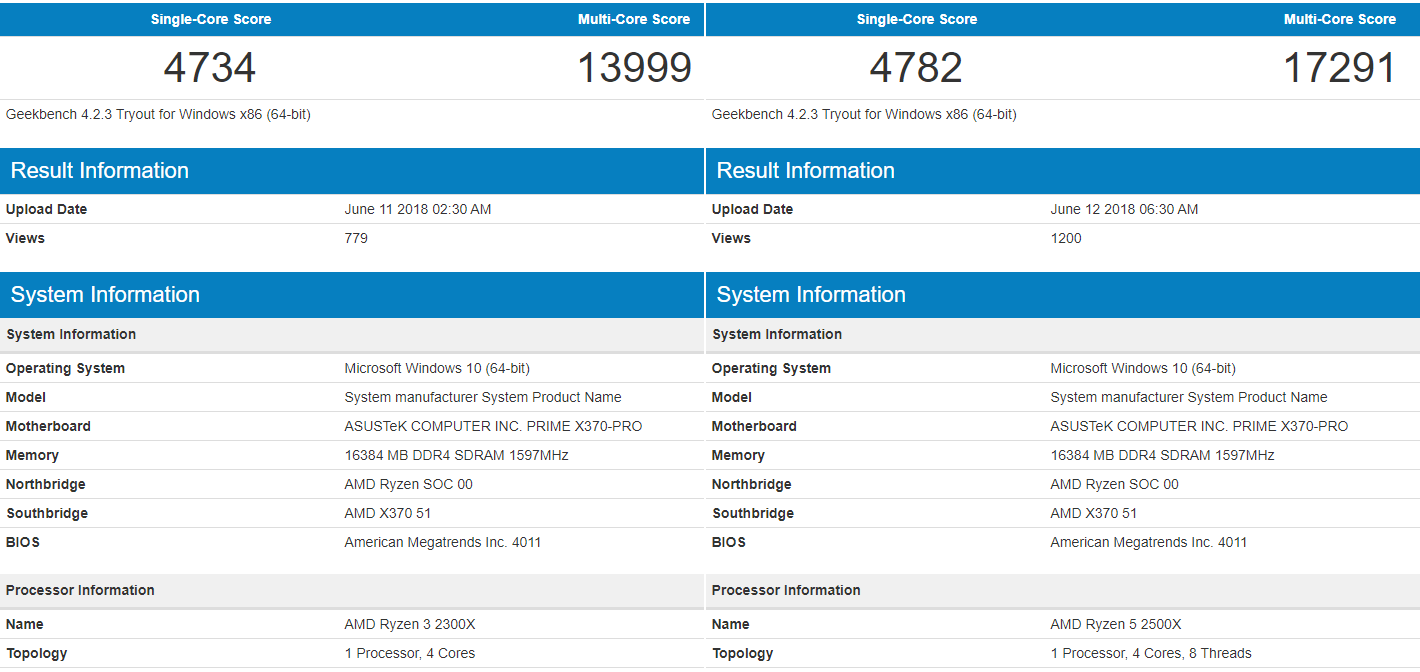
Recently, two benchmark scores of the upcoming 4-core Ryzen CPUs had been spotted on Geekbench’s results. The shown CPUs are the Ryzen 3 2300X and Ryzen 5 2500X. Both of them are expected to have most of the features and improvements brought by the updated 12 nm Zen+ micro-architecture. They will have slightly higher base and boost clock frequency, and compatible with the existing AM4 motherboards.
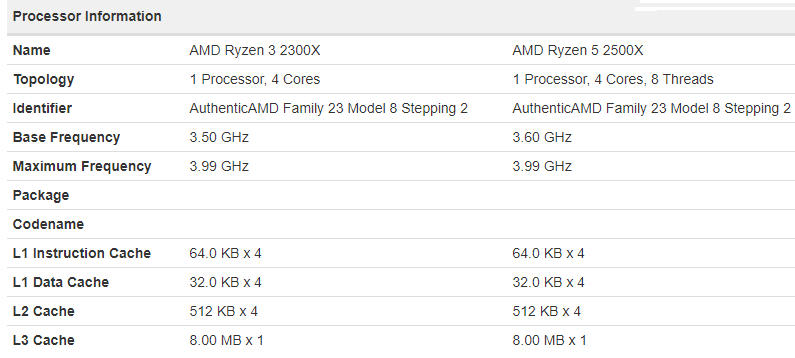
According to the benchmarks, the Ryzen 3 2300X will be a 4-core processor with no SMT enabled (multi-threading). It will be clocked at 3.50 GHz and can be boost up to 4.0 GHz. It scored at 4734 for single-core performance and 13999 for multi-core, which is comparable to Intel Core i5-7600 or i5-7600K (their Geekbench scores). We expect its price would be similar to the previous generation Ryzen 3 1300X at around $120 to $130 USD.
The Ryzen 5 2500X will have 4 cores and 8 threads, clocked at 3.60 GHz. It has the same amount of L2 and L3 cache as the 2300X (2 MB and 8 MB). The turbo boost clock is also up to 4.0 GHz. In the benchmark, it scored 4782 and 17291 in single-core and multi-core respectively. The results are similar to the Intel Core i7-7700 (its Geekbench scores). It should cost around $150 to $170 USD, just like the Ryzen 5 1500X.
So far the results from those two new Ryzen processors look pretty promising. They scored close to Intel’s last generation (7th Gen) high-end processors, not to mention they support overclocking, the same AM4 motherboards and much lower price.
Feel free to leave comments below, if you have any opinion about this website. Share the website around if you enjoy reading it. Subscribe to our Newsletter or follow our Google+, Facebook and Twitter.
Support this website simply by shopping in Amazon. It will give us small kickbacks, if you use the above affiliate links to make any purchases, which will help us grow.
Valve announced the release of a mobile streaming app for both iOS and Android in May, called Steam Link. The app is designed to allow devices, like smartphones and tablets, to play PC games by connecting via wireless 5 GHz Wi-Fi or wired Ethernet network. However, Apple shortly rejected the app to launch on the App Store, due to “Business Conflict”.
It is believed that the Steam Link app for iOS offered users to buy games through Steam. This obviously broke Apple’s guidelines of not allowing in-app purchases outside the App Store, which Apple will not be able to take a 30% revenue cut for each sale. Fortunately, Apple has revised and clarified the App Store review rules for developers at WWDC 2018.
New guidelines state that mirroring app (4.2.7 Remote Application Mirroring), such as the aforementioned Steam Link app, should not provide a store-like interface and the ability to browse and purchase any software. It is acceptable if the transactions happen at the host device/PC, the developers are not required to use the in-app purchase.
And according to TouchArcade, the latest beta version of Steam Link app for iOS has already remove the in-app game purchasing function. When you want to buy anything, a message, “available for purchase from your PC”, will be shown. You can still use the funds inside your existing steam wallet. Apple in fact did say it is working with Valve to solve this situation. It seems like the Steam Link app will soon be up on App Store, after the above changes have been implemented.
Feel free to leave comments below, if you have any opinion about this website. Share the website around if you enjoy reading it. Subscribe to our Newsletter or follow our Google+, Facebook and Twitter.
Support this website simply by shopping in Amazon. It will give us small kickbacks, if you use the above affiliate links to make any purchases, which will help us grow.
RGB lighting has become a trend in PC building. A lot of components now add RGB as one of the main features. This time, we have got our hands on RAIJINTEK’s latest IRIS 12 Rainbow RGB fan.
Unboxing
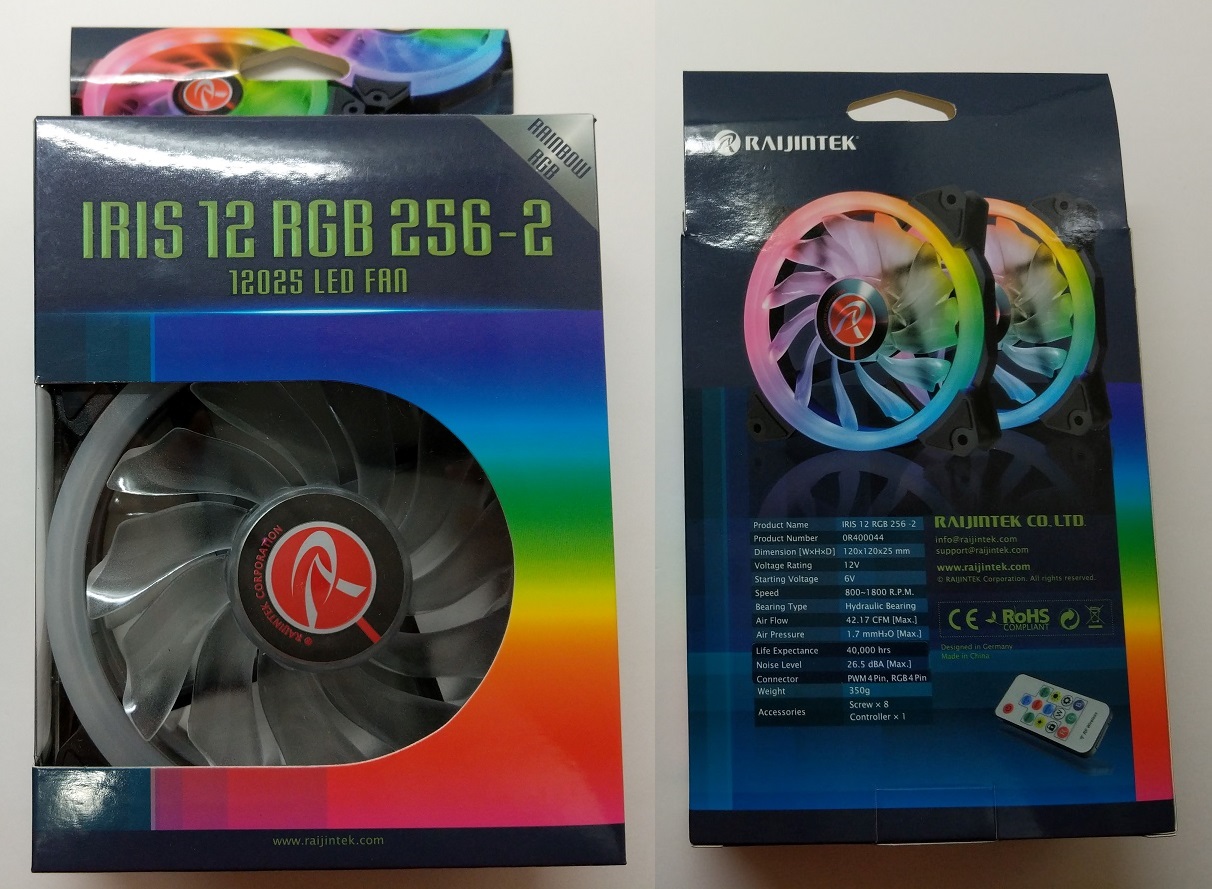
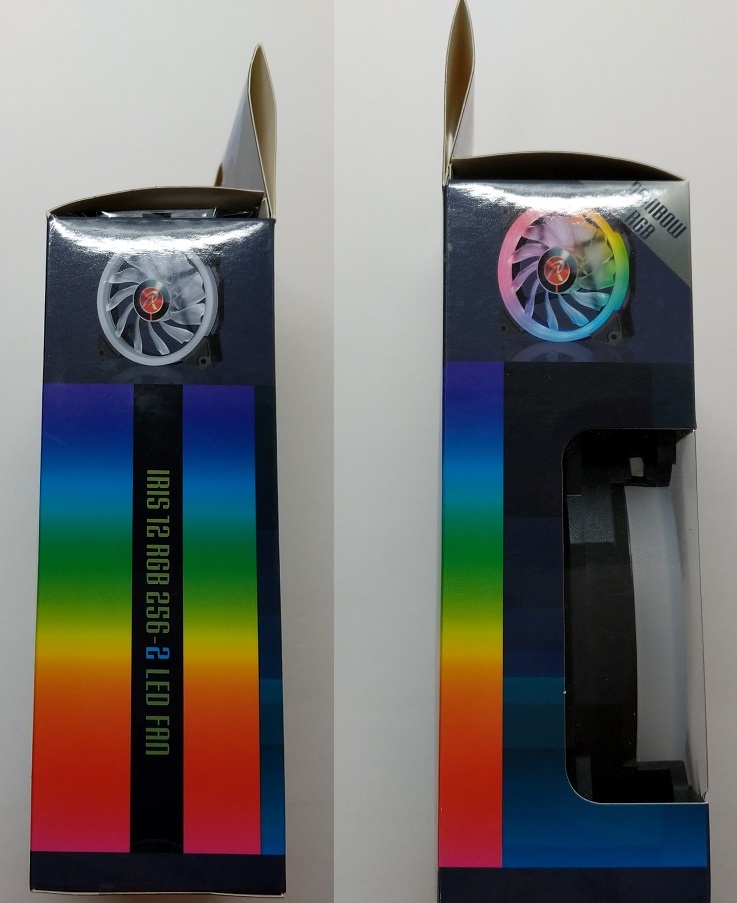
You can get the IRIS 12 RGB fan in either single, two or three fan packs. The fans are shipped inside a colorful cardboard box. At the front, the model name is printed, with a plastic window showing the actual fans. Detailed specifications, such as the airflow and air pressure ratings, can be found on the back.
The plastic window extends to the side, as well as a tiny picture of the IRIS 12 fan on the top.
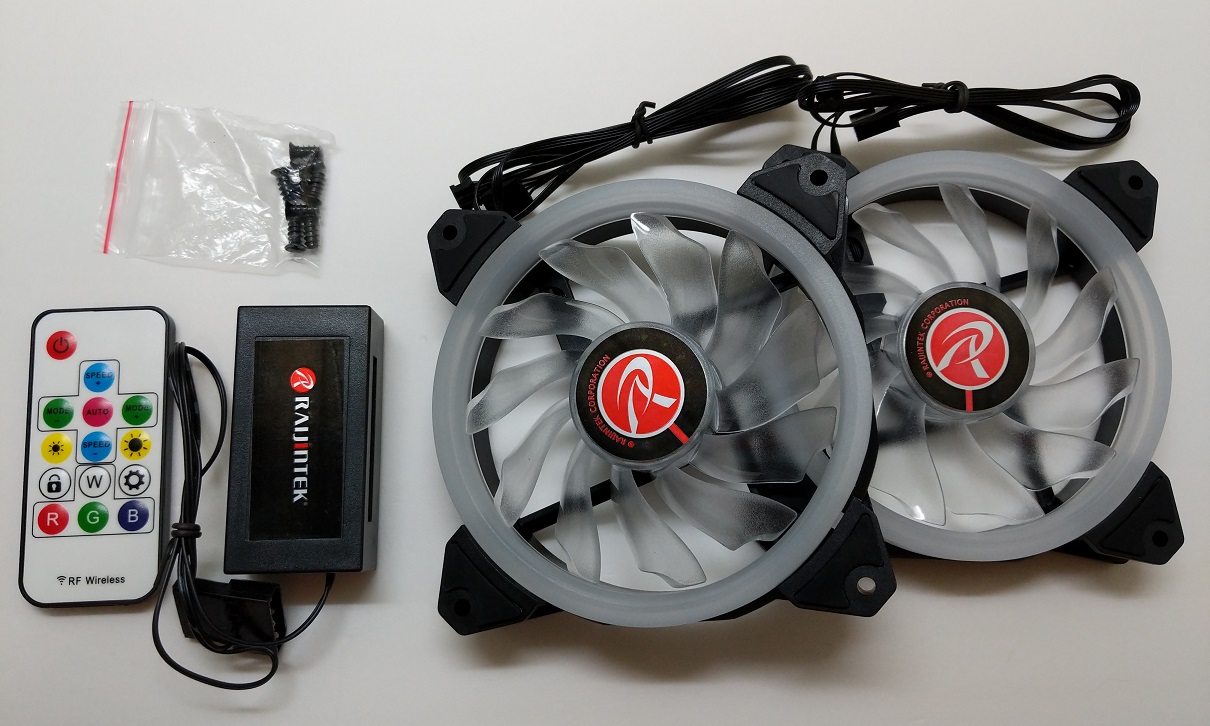
Inside the packaging, there are the RGB LED controller and wireless remote to handle the fans’ RGB lighting. A total of eight screws are included, if you plan to install the IRIS 12 fans as case ventilation.
RAIJINTEK IRIS 12 Rainbow RGB Fan
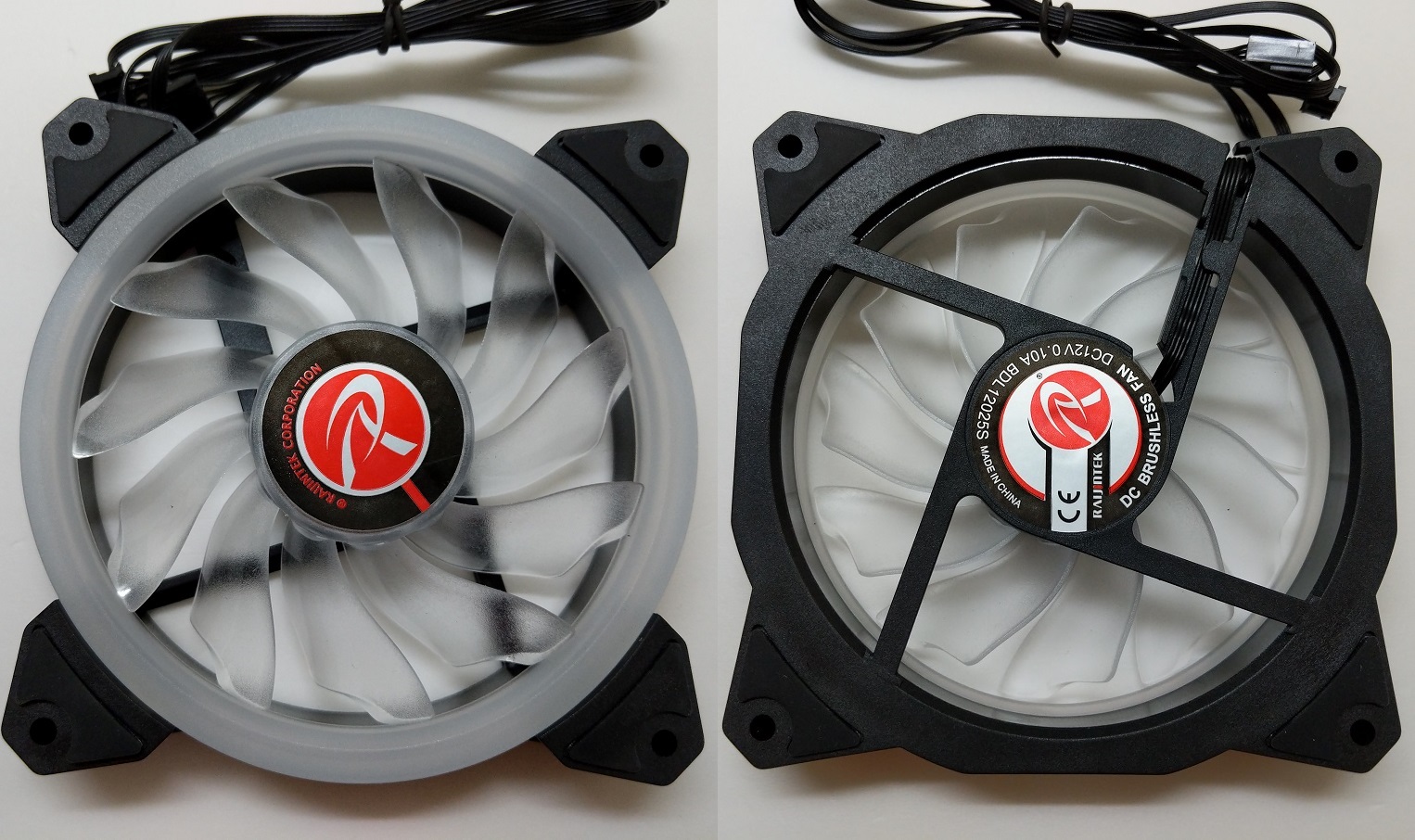
The IRIS 12 fan has a physical size of 120 mm x 120 mm x 25 mm. It gets a total of 11 transparent blades, that can spin from 800 RPM to 1800 RPM. The speed is controlled via the 4-pin PWM connector. The fan uses hydraulic bearing and has a rated MTBF at 40,000 hours.
You can see the O-type LED ring at the front, which there are a total of 15 RGB LEDs underneath the translucent plastic light diffuser. The back of the fan is the black fan frame, that provide the necessary structural rigidity and cable routing. You can only see the light from the side and front.
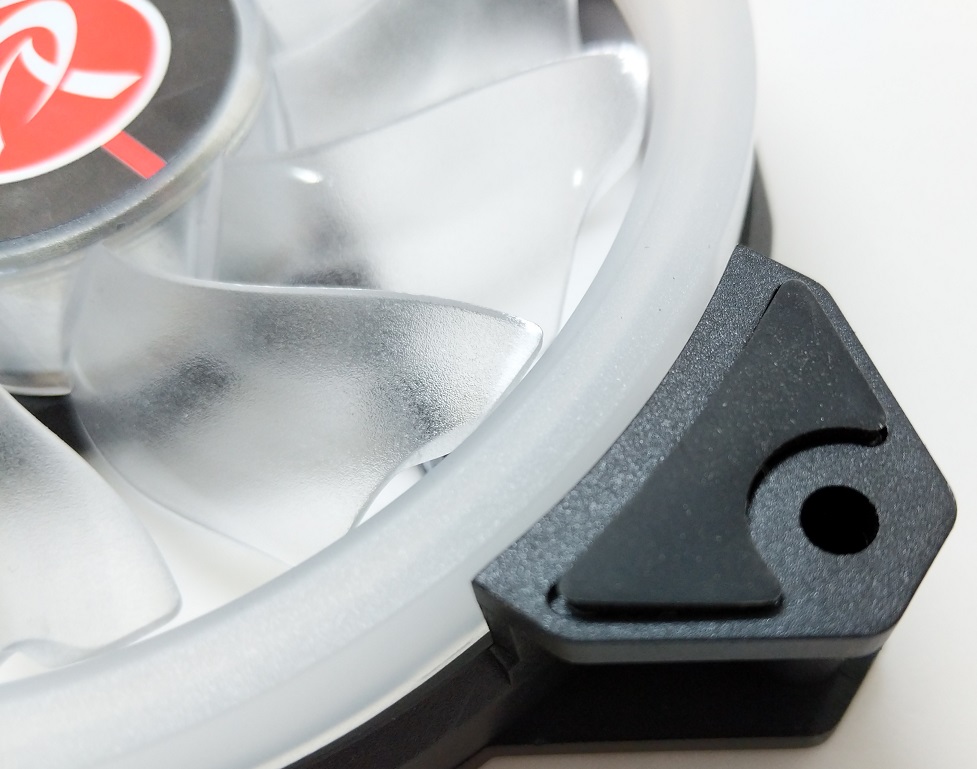
There is an anti-vibration rubber pad on each corner of the fan.
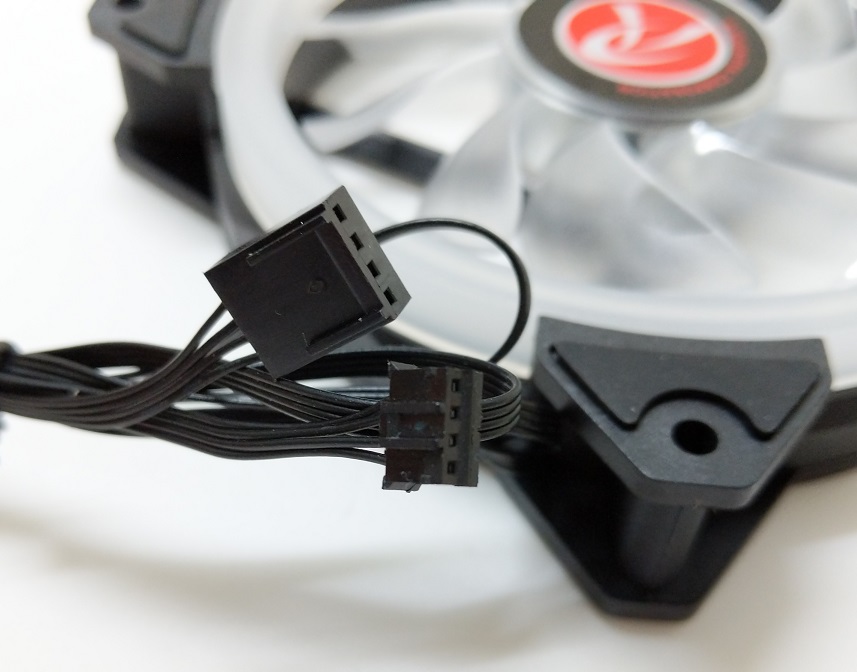
Apart from the normal 4-pin PWM fan connector, another 4-pin connector is required to control the RGB LED. Both cables are routed to come out at the same corner of the fan.
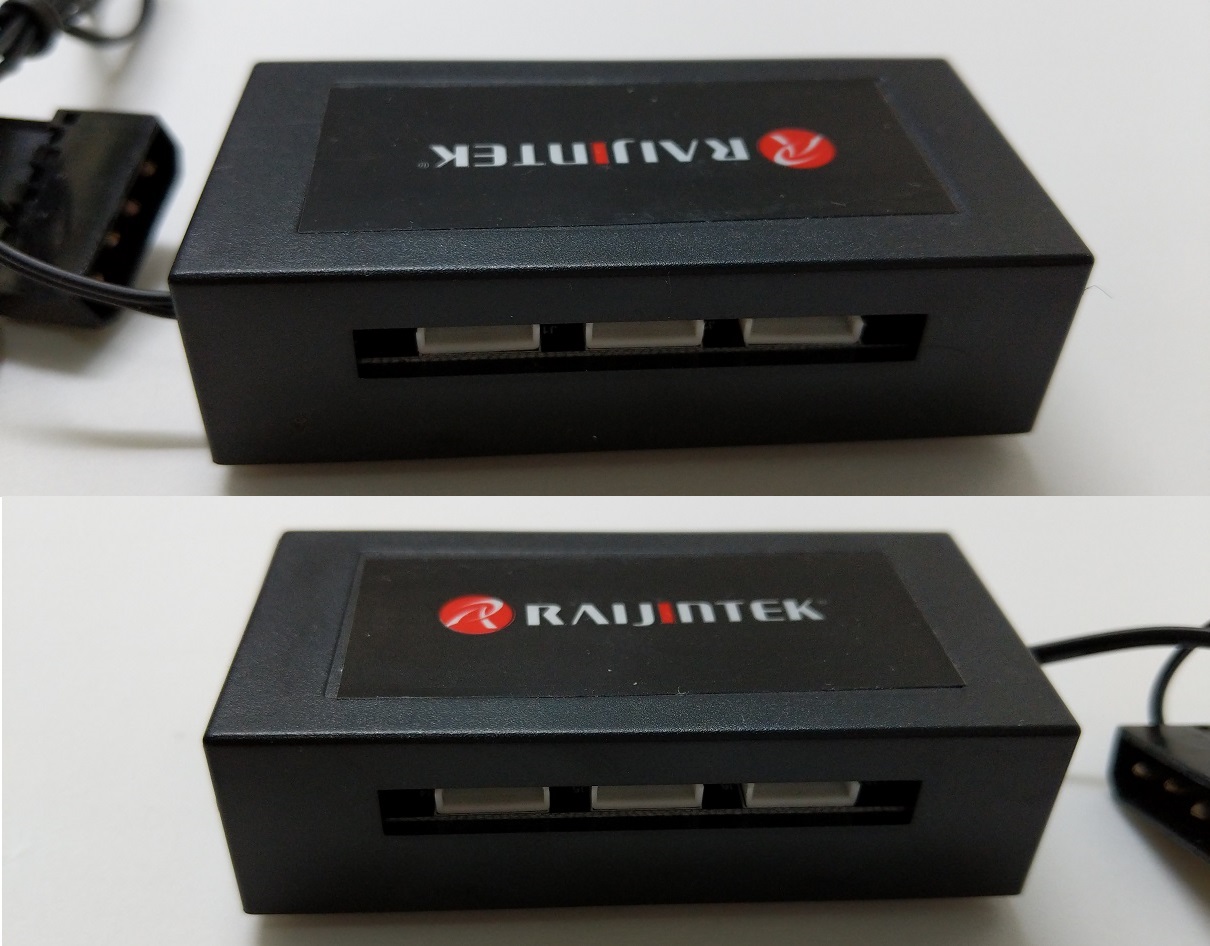
Top 3 ports are 1, 2 and 3; Below are 4, 5 and 6
The RGB LED controller can control up to six IRIS 12 RGB fans at the same time, three on each side. According to RAIJINTEK, earlier batches of these fans do not label the ports in numbers. For some lighting effects, you will have to connect the fans to the ports in correct order. Fortunately, it should be fixed after the first mass production.
To clarify, when the “RAIJINTEK” logo is on the top and the cable is coming out on the left, those three ports are 1, 2 and 3 (counting from the left). When the cable is on the right, those three are 4, 5 and 6.
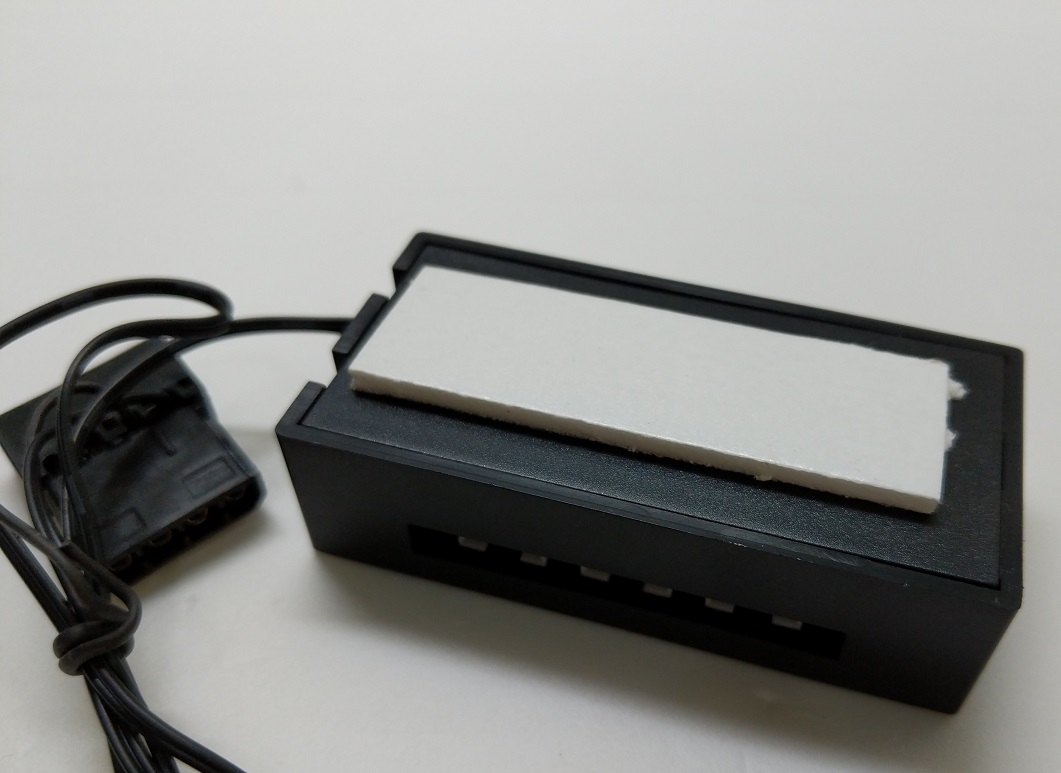
There is piece of double-sided tape on the bottom of the hub, allowing you to mount it anywhere inside your PC case. The hub will require a 4-pin molex connector to power.
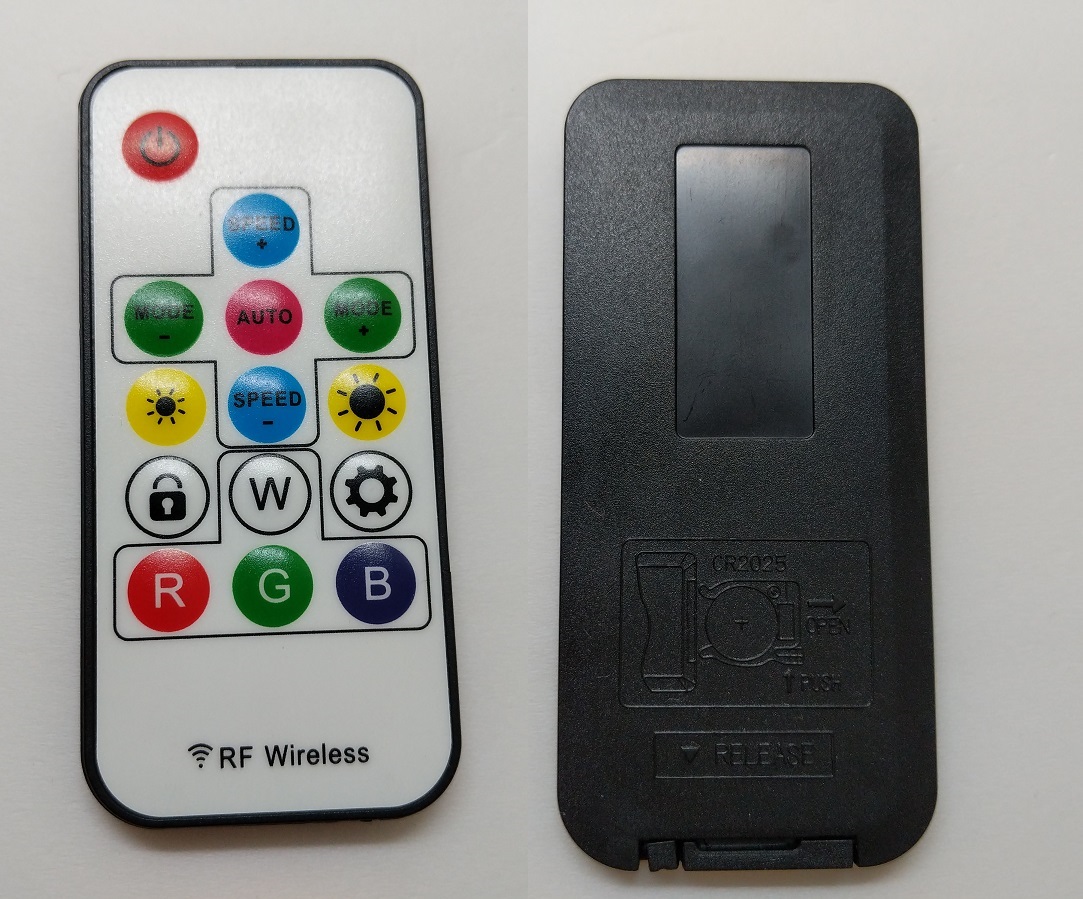
The remote control is paired with the above 6-port LED hub. It is powered by a CR2025 lithium button cell battery, which is the same type as your motherboard’s CMOS battery.
There is a total of 13 buttons on the remote. The “W”, “R”, “G” and “B” buttons will set the light to static white, red, green and blue colors. The “SPEED +” and “SPEED -” will change the speed of the lighting effects. You can also change between 13 dynamic color modes and 7 static colors. The “AUTO” button will cycle between all modes, each will last for 10 seconds.
Review
Testing Methodology
To determine the performance of the fan, we will measure both the airflow and CPU temperatures when using in heatsink.
An anemometer is used to record the fan’s airflow in various RPM ranges, including 25%, 50%, 75% and 100%. The results are measured in CFM (cubic feet per minute). The distance between the anemometer and the fan is kept at around 5 cm.
The fan is then installed on the air cooler. The CPU, FPU and system cache are stressed using AIDA64. Ambient temperature is around 25°C. The temperature of the CPU package is recorded at idle and full load when the fan is running at full speed.
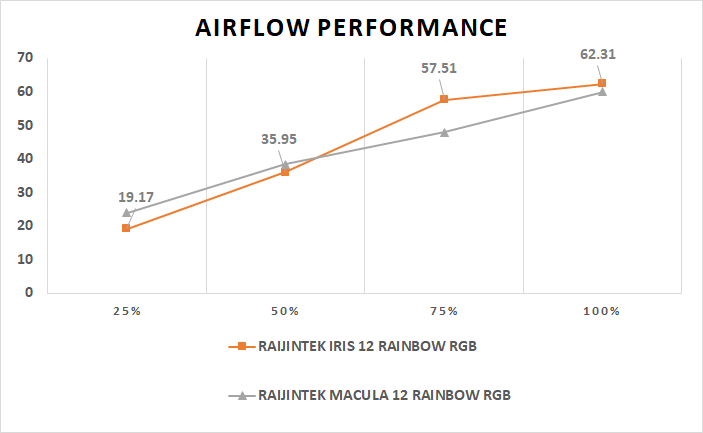
The RAIJINTEK IRIS 12 fan performed similar if not better than the MACULA 12, which is the one used in the LETO PRO RGB CPU cooler. Its airflow reached a maximum of 62.31 CFM, a 47.8% increase from the rated 42.17 CFM. At 75% speed, the fan could still output 57.51 CFM of airflow.
The fan’s static pressure determines how well the air can pass through a restricted area, such as heatsinks and radiators. Different designs of the fan blades are required to optimize for either airflow or static pressure.
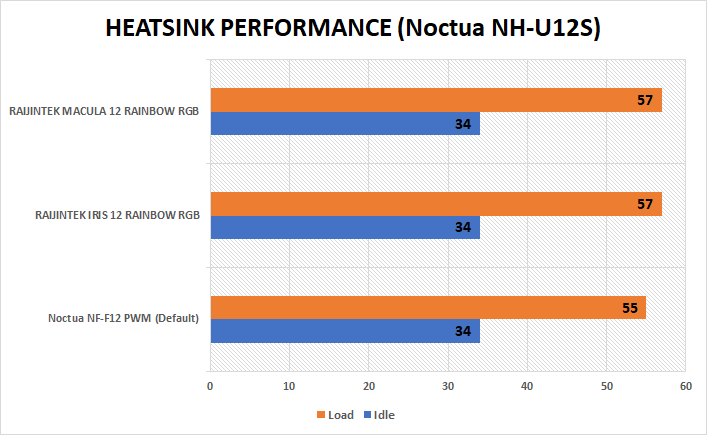
In the test, all the fans are set to spin at full speed. The cooler’s default fan, NF-F12 PWM (its review here), did the best here, keeping the CPU package temperature at 55°C. Both the IRIS 12 and MACULA 12 performed slightly worse, but only 2°C hotter at load. Do note that the NF-F12 runs at 1500 RPM while the other two at 1800 RPM.
Conclusion
The RAIJINTEK IRIS 12 Rainbow RGB fan is a decent performer, and at the same time provide a relatively attractive aesthetic. However, it will need to spin at higher RPM in order to achieve similar cooling performance as other more premium fans, such as the Noctua NF-F12. At full speed, the fan is a tad bit noisier, but it is still acceptable.
The RGB lighting effects look really bright and vivid in person. The driverless approach for the RGB LED is the double-edged sword. On one side, it offers a simpler and easier way to control, but it lacks the versitile customizations of a software.
Overall, the IRIS 12 Rainbow RGB fan has struck a great balance between price, performance and functionality. It can be used for either case ventilation or heatsink/radiator cooling. You can buy the fan in single, two or three packs. They are priced at $19.99 USD, $59.99 USD and $74.99 USD (MSRP) respectively. At the time of this review, the fans are on sale with a ~25% discount.
You can purchase the fans from your local/online resellers or the links below from Amazon or Newegg.
Thanks RAIJINTEK for providing us the IRIS 12 fan for review. (Review Sample)
Feel free to leave comments below, if you have any opinion about this website. Share the website around if you enjoy reading it. Subscribe to our Newsletter or follow our Google+, Facebook and Twitter.
Support this website simply by shopping in Amazon. It will give us small kickbacks, if you use the above affiliate links to make any purchases, which will help us grow.