Just after Intel’s announcement of the 28-core enthusiat level HEDT CPU, AMD responds with its own 2nd Generation Threadripper processor with more cores and possibly more performance.
Existing 1st Gen Threadripper processor is based on the 14 nm Zen micro-architecture, paired with AMD X399 motherboard chipset. The highest sku, Threadripper 1950X has 16 cores and 32 threads, running at a base clock of 3.4 GHz and boost clock of 4 GHz.
Similar to the recently released 2nd Gen Rzyen processors, the new 32-core Threadripper 2 CPU will be using the improved 12 nm Zen+ micro-architecture. Previously, the 16-core 1950X contains a total of eight Core Complexes (CCX, each has 4 cores, 8 threads and 8 MB of L3 cache) on four dies, but half of the dies are disabled for the required core counts. Now, the 32-core processor will have all CCXs and dies enabled.
This is the same layout as the server-grade EPYC processor. However, the Threadripper 2 CPU will remain to have 4 memory channels and 64 PCIe lanes, instead of 8 and 128.
Unlike Intel’s 28-core processor, the new Threadripper 2 will support the same Socket TR4, as well as X399 motherboard chipset. Though, the CPU would require power up from 180 watts to 250 watts, which not all existing motherboards can supply this much power sufficiently.
The new 32-core processor is expected to release in the 3rd quarter of 2018. Price has not been announced yet. For reference, the 16-core Threadripper 1950X costs $999 USD (MSRP). You can watch the complete AMD’s keynote in Computex 2018 in its YouTube channel.
Feel free to leave comments below, if you have any opinion about this website. Share the website around if you enjoy reading it. Subscribe to our Newsletter or follow our Google+, Facebook and Twitter.
Support this website simply by shopping in Amazon. It will give us small kickbacks, if you use the above affiliate links to make any purchases, which will help us grow.
Update: The 28-core CPU is indeed manually overclocked and is cooled by a massive refrigerated liquid cooling loop, that can keep the temperatures under ambient.
Intel announced a series of Core i5, i7 and i9 Extreme Edition processors at last year Computex 2017. The most powerful and expensive CPU is the i9-7980XE, with 18 cores and 36 threads at 2.6 GHz. Now, Intel teased their upcoming new generation high performance processor with up to 28 cores and 56 threads.
Normally, higher core count means slower CPU core frequency, but the new 28-core CPU can run at up to 5 GHz on all cores. For reference, the 18-core i9-7980XE has a maximum turbo boost clock of only 4.2 GHz on one core and around 3.4 GHz on all cores. During Intel’s Computex Keynote, a CINEBENCH R15 benchmark was shown on a prototype machine. It got a score of 7334, which is incredibly high for a single-socket system. The existing 28-core Xeon Platinum 8180 can score about 5000 points in CINEBENCH. However, we do not know if the new CPU is manually overclocked to 5 GHz or by default.
The new processor has to be huge to house all those 28 cores. It will be using the LGA 3647 socket, which is previously designed for servers. We would be seeing new high-end consumer motherboards coming out later this year.
Currently, the 18-core Core i9-7980XE costs about $1800 USD (MSRP) and 28-core Xeon Platinum 8180 over $10,000 USD (MSRP). The new HEDT processor will not be affordable by any means possible, especially a new LGA 3647 motherboard is also required.
Feel free to leave comments below, if you have any opinion about this website. Share the website around if you enjoy reading it. Subscribe to our Newsletter or follow our Google+, Facebook and Twitter.
Support this website simply by shopping in Amazon. It will give us small kickbacks, if you use the above affiliate links to make any purchases, which will help us grow.
Update:Intel has confirmed the launch of the i7-8086K Limited Edition CPU. It will be on sale on 8 June. The full specifications are available on Intel’s website. And a giveaway is also held to celebrate the launch.
40 years before, Intel released its iconic 8086 16-bit processor in 1978. It is one of the most suscessful and important chips from Intel, because of its x86 architecture design. Now, there are rumors around the Internet about Intel making a new processor to celebrate the 8086’s 40th anniversary, modelled i7-8086K.
According to VideoCardZ, they have spotted the Core i7-8086K’s listing on multiple online retailers’ websites. Some of the listings have been taken down shortly afterwards. The processor is listed to sell at a price of €480 EUR or $480 USD, which is a $100 EUR/USD premium over the i7-8700K.
Base on all the information, the i7-8086K will be a 6-core, 12-thread processor similar to a i7-8700K. Not only the core and thread count, the 12 MB of L3 cache remains the same size as the 8700K. It will be using the same 14 nm manufaturing process and LGA 1151 socket. The CPU should be compatible with the latest 300-series motherboards, such as Z370, H370, H310 and B360. Intel HD 630 Graphics is also rumored to be integrated into the chip.
The i7-8086K is listed to have a base clock of around 4 GHz and can turbo boost up to 5 GHz. The new turbo boost clock is 300 MHz more than the 8700K’s 4.7 GHz. From what we know so far, the 8086K seems to be a specially binned CPU, which may be a cherry-picked 8700K with better overclocking ability. This also means you may be able to squeeze out even more performance after overclocking.
All of these are just rumors, the i7-8086K may or may not exist. We do not know its detailed specifications or release date. Intel did actually sell the Pentium G3258 to celebrate the 20th anniversary of Pentium-branded processors in 2014.
Feel free to leave comments below, if you have any opinion about this website. Share the website around if you enjoy reading it. Subscribe to our Newsletter or follow our Google+, Facebook and Twitter. If you like our content, consider becoming one of our patrons.
Support this website simply by shopping in Amazon. It will give us small kickbacks, if you use the above affiliate links to make any purchases, which will help us grow.
Before Logitech released the G900 Chaos Spectrum Gaming mouse and its revolutionary LIGHTSPEED wireless technology in 2016, most manufacturers’ claims about using a wireless mouse for low-latency gaming seemed unreal and over-optimistic. Since then, wireless gaming mouses take a huge leap forward.
This time, we are taking a look at Logitech’s more budget-friendly G603 wireless mouse with the new HERO optical sensor.
Unboxing
The “G603” model number and Logitech’s logo colored in vibrant blue, are printed at the front of the packaging, with a side view of the mouse. The design looks simple, yet elegant.
At the back, there are four highlights for the mouse. The G603 features the new HERO sensor, LIGHTSPEED wireless technology, up to 500 hours or 18 months of battery life and Bluetooth connectivity.
There is a detailed specifications list located on the side of the box, including sensor information, durability, battery life and physical dimensions.
The G603 supports all major operating systems and devices, such as Windows 7 or later, macOS X 10.8 or later, and Android. You also get contact information for tech support at the bottom of the box.
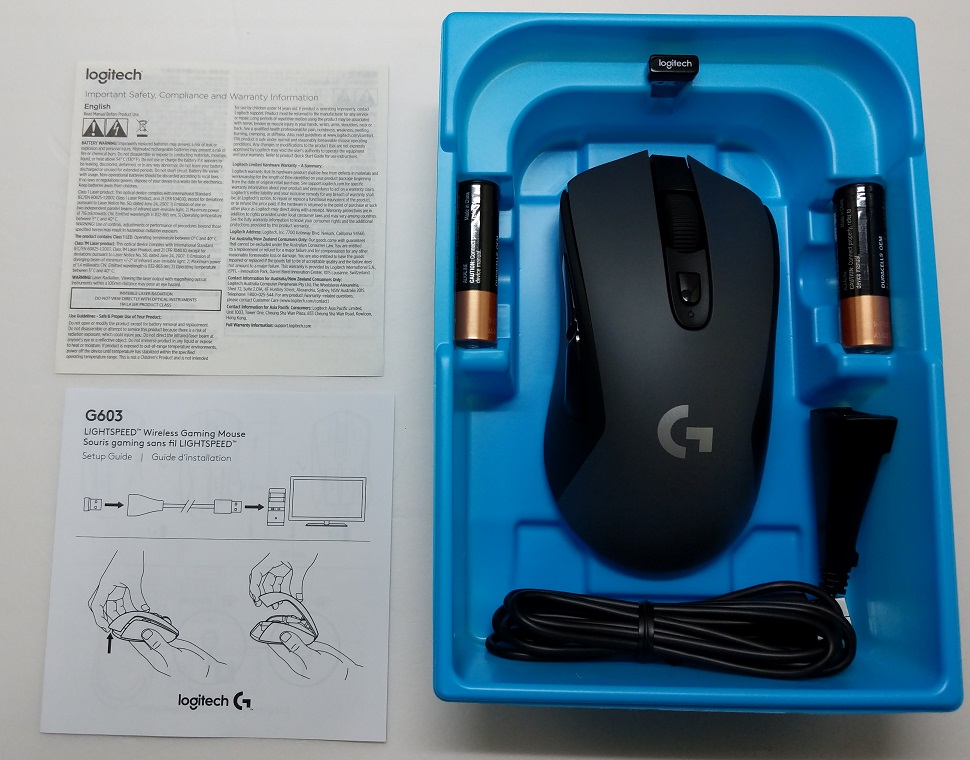
All the accessories are neatly kept inside the blue plastic tray. You will receive two pieces of paper. One is the safety and warranty information, the other is a quick start/setup guide.
There is the LIGHTSPEED compatible USB receiver, which has the G603 model number on the side and is capable of report rate up to 1000 Hz (1 ms). A long USB extension cable is available, if you want better signal from the PC. Logitech also includes a pair of AA alkaline batteries, in case you do not have one lying around.
Review
Logitech G603 Wireless Gaming Mouse
The G603 mouse is designed primary for right-handed users with the two side buttons on the left side. It is a medium-sized mouse that should accommodate most grip types well. The shape is similar to Logitech’s own G403 and G703 wireless mouses.
The mouse has a physical dimensions of 124 mm (length) x 68 mm (width) x 43 mm (height).
There are a total of six programmable buttons on the G603 mouse, including the DPI switch on the top. Nothing is located on the right side. The top plate and the sides are made out of matte plastic, which is smooth to the touch but not slippery. No RGB lighting is available in the G603.
The main right and left click buttons are genuine Omron switches, which are rated for over 20 million clicks. The scroll wheel is smooth and precise, but do not have Hyper-fast Scrolling for long pages of documents/websites. The two side buttons are big and easy to found.
The G603 mouse houses the new HERO optical sensor (High Efficiency Rated Optical), that is located in the center. Logitech claims the sensor has performance similar to the high-end, famous PMW3366 optical sensor, while providing up to ten times better battery life. The HERO sensor tracks across 200 to 12000 DPI.
There are two other switches/buttons at the bottom. One is the mode/power switch, which is used to set the report rate of the mouse (HI: 1 ms/1000 Hz ; LO: 8 ms/125 Hz). HI mode allows for non-stop gaming for 500 hours, and LO for up to 18 months (2 batteries). The other button is to turn on Bluetooth connection. The LED will flash in blue if Bluetooth is on.
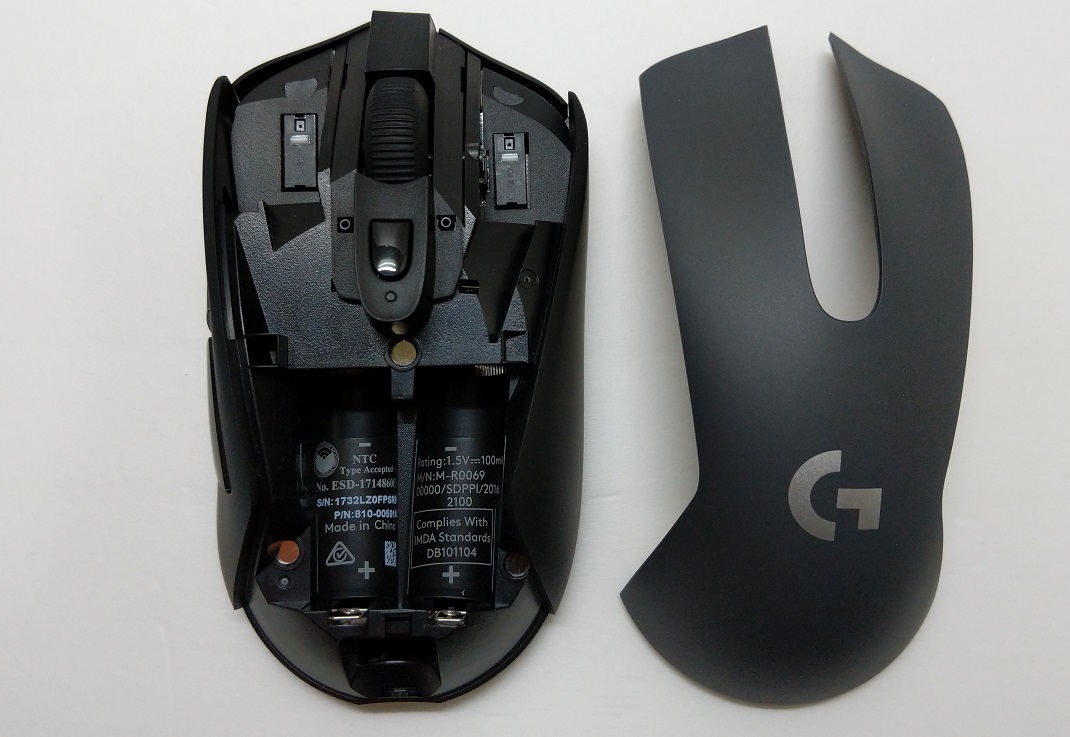
The top plate is removable to reveal the battery compartment, and is held in place by magnets. You can install either one or two AA batteries inside the G603. The dry weight of the mouse is 88.9 grams, and you add about 30 grams more with each battery.
User Experience
With the LIGHTSPEED wireless technology, the G603 mouse operates perfectly without any noticeable latency in HI mode. I do not recommend using the mouse in LO or Bluetooth mode when gaming, because the tracking is less responsive, but is fine for other daily tasks. Battery life is excellent and lasts about 2 months with two 1000 mAh AA rechargeable batteries at HI performance mode, well over Logitech’s advertised 500 hours.
The HERO optical sensor tracks the mouse movement impressively on most surfaces. The cursor does not jitter or rattle, when lifting off the mouse at normal distance (within 3 mm). There is no mouse acceleration at all.
During my time of using the G603, I did experience an issue with the scroll wheel. The scrolling was not smooth and may sometimes scroll to the opposite direction. Fortunately, a firmware update was available to fix the problem.
Software
The Logitech Gaming Software uses the Logitech Gaming Software, just like any other Logitech’s gaming peripherals. This is where you customize everything about the mouse. You can reprogram all the six buttons, as well as setting up to five DPI levels and polling rates of the mouse. The battery indicator and notification is a great addition to the software.
Conclusion
The Logitech G603 wireless gaming mouse performs outstandingly in most aspects. It is the forth LIGHTSPEED compatible mouse from Logitech. By removing the trendy RGB lighting and internal rechargeable battery, the G603 is the more budget-friendly one in the lineup. It still offers accurate tracking performance and great customization with the HERO sensor.
Most importantly, the battery life is unbelievable, always lasts upwards of 2 months, even in HI performance mode. You will not need to regularly swap batteries if you use the G603 mouse. It is also convenient and versatile to allow users to decide using a single or two batteries as custom weights.
It would be great if the mouse supports wired mode for best possible performance or when in low battery. The G603 has a MSRP of $69.99 USD, but is often cheaper at around $56 USD (at the time of this review). At this price, we are looking at one of the best wireless gaming mice in the market, a functional yet affordable mouse from Logitech.
Feel free to leave comments below, if you have any opinion about this website. Share the website around if you enjoy reading it. Subscribe to our Newsletter or follow our Google+, Facebook and Twitter.
Support this website simply by shopping in Amazon. It will give us small kickbacks, if you use the above affiliate links to make any purchases, which will help us grow.
Starting from iPhone 6 in 2014, Apple has included NFC inside its smartphones, but only limits the usage to its own mobile payment platform, Apple Pay. Third-party applications are not given the required permissions and access to the NFC chip. Now, there are rumors saying that Apple will announce new ability of the NFC in next month’s WWDC.
According the MacRumors, the new NFC functionalities may be about building security and public transport ticketing. Currently, a similar door unlocking system using iPhone’s onboard NFC is already implemented in the Apple’s Campus. The system is created by Apple and HID Global.
There are already some hotels that allow customers to use their iPhones as a key to unlock the room’s door, but most systems use Bluetooth, instead of using NFC. Also, Apple started including the FeliCa chip inside the iPhones (iPhone 7 or later), which can be used at contactless payment method in Japan’s public transport network.
For these applications, NFC offers a more secure and power efficient way than Bluetooth. It is good that Apple finally allowing more developers to utilize the chip in the iPhones.
Feel free to leave comments below, if you have any opinion about this website. Share the website around if you enjoy reading it. Subscribe to our Newsletter or follow our Google+, Facebook and Twitter.
Support this website simply by shopping in Amazon. It will give us small kickbacks, if you use the above affiliate links to make any purchases, which will help us grow.
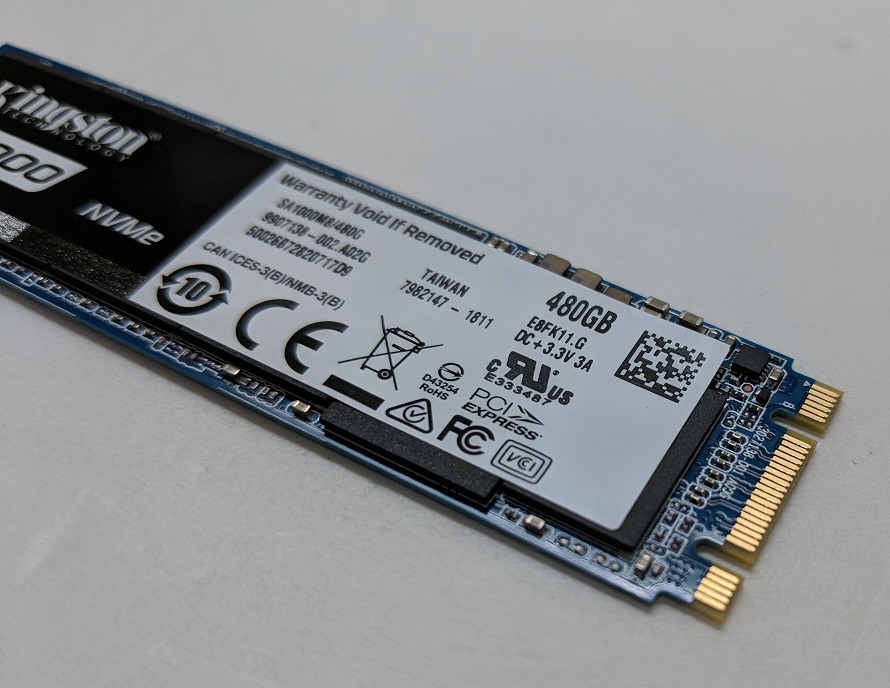
Similar to what SATA SSDs did to traditional spinning hard drives in the past few years, newer and faster NVMe PCIe SSDs are taking over the market. With the introduction of 3D TLC NAND flash, a lot more budget NVMe PCIe SSDs are released recently with lower costs and larger capacities for mainstream consumers. The Kingston A1000 NVMe PCIe SSD is the one we are taking a look at in this review.
Specifications
According to Kingston, the A1000 SSD is using a PCIe 3.0 x2 lane to handle all the file transmission. It will be available in only the M.2 2280 form factor, with three different capacities (240 GB, 480 GB and 960 GB). All models are capable of having sequential read speed of up to 1500 MB/s, while higher capacity one has slightly better write speed up to 1000 MB/s.
Unboxing
The package of the A1000 SSD is very minimal. The SSD is stored inside a small plastic case with tape around to keep it secure. It is similar to what system memory normally would use.
Flipping to the back, there are some information about the SSD, such as the model number, capacity and UPC code.
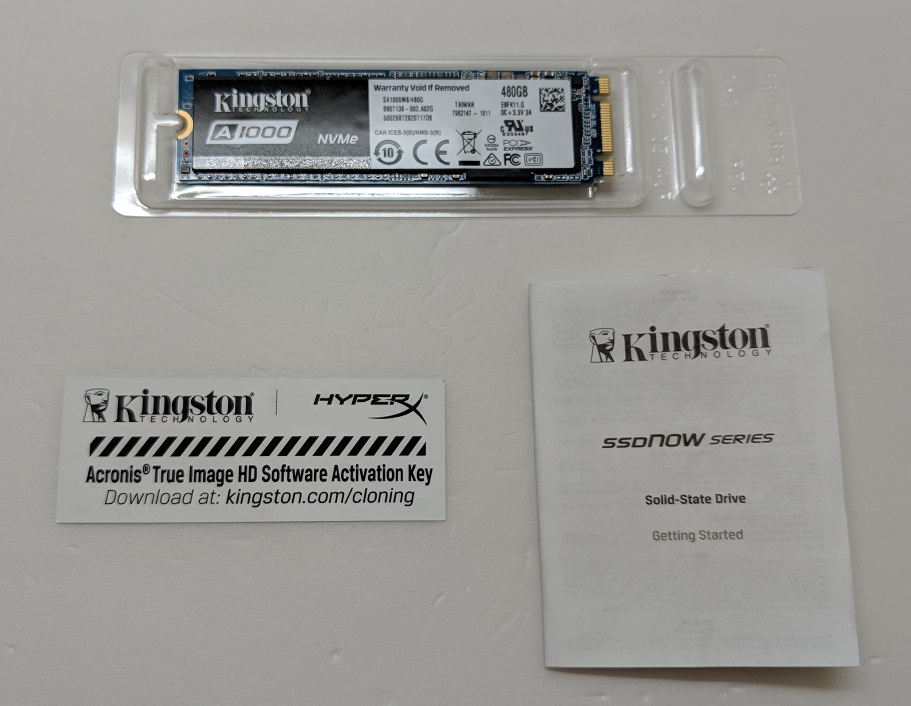
You will find a user manual and a set of activation key for the Acronis True Image HD software. The program will allow you to back up the entire drive, clone the operating system or restore data from previous backups.
Kingston A1000 NVMe PCIe SSD
Since the A1000 SSD is using the M.2 2280 form factor, the drive is pretty tiny. It is 22 mm in width and 80 mm in length. There is a sticker on the top of the drive’s controller and NAND flash chips, with information like capacity and serial number of the SSD.
The A1000 SSD uses the one-sided design, that no chip is located on the back of the PCB. The drive runs on Phison E8 NVMe controller (PS5008-E8) and is paired with the 3D TLC NAND flash from Toshiba.
Review
Testing Methodology
To test the performance of the solid-state drive, we use three well-established storage benchmarking software. They are CrystalDiskMark, ATTO Disk Benchmark, as well as AS SSD Benchmark.
CrystalDiskMark can measure both sequential and random 4KB read/write speeds with a queue depth of 32. ATTO Disk Benchmark can test how the drive performs across different transfer block sizes, mostly in a sequential environment. AS SSD Benchmark can provide both normal read/write speed and the IOPS performance of the drive.
The PCIe 3.0 x2 Lane has a theoretical bandwidth of about 2 GB/s. In CrystalDiskMark, we can see the Kingston A1000 SSD almost saturated all available bandwidth in sequential operations, at over 1600 MB/s in read and 1000 MB/s in write. At random 4K (Queue Depth 32), the drive did very good with both read and write speed around 500 to 600 MB/s.
Test Size = 1 GB
The maximum sequential speed dropped to about 1100 MB/s in read and 900 MB/s in write, when using AS SSD Benchmark. In 4K random with queue depth of 64, the drive did exceptionally well with read and write speed at 835 MB/s and 669 MB/s respectively.
Test Size = 1 GB
IOPS number represents how well a drive handles random input and output operations. The A1000 SSD scored 2351 in the test. It reached 214520 and 171146 IOPS in 4KB (Queue depth 64) read and write operations, which is over 400 times higher than a traditional hard drive.
In ATTO Disk Benchmark, the read and write speeds increased when the test file size became larger. Once the size reached 256 KB, the performance was stabilized at 1600 to 1750 MB/s (read) and 1000 MB/s (write).
Comparison
[visualizer id=”2840″]
[visualizer id=”2842″]
When comparing the A1000 SSD with other drives we tested, we can see the A1000 outperfroms every SATA HDDs and SATA SSDs as expected. It performs about 8 times better in sequential read and 5 times faster in write than the Seagate Barracuda 1TB HDD (its review here). It is also a noticeable upgrade over a SATA SSD in both random and sequential operations, especially considering the reduced size.
Conclusion
The Kingston A1000 NVMe PCIe SSD is the second NVMe SSD from Kingston, after the high-performance KC1000. This time, Kingston focuses on the more affordable, mainstream consumer market. Though, the A1000 does not sacrifice in performance, able to reach read and write speed as advertised, at over 1600 MB/s and 1000 MB/s.
With the 3D TLC NAND flash, the A1000 offers higher capacity models up to 960 GB and maintains decent durability. It has a MTBF at 1,000,000 hours and acceptable rated endurance at up to 600 TBW (960 GB model).
The A1000 SSD is priced slightly more expensive than other entry-level NVMe SSDs at MSRP $184.99 USD (480 GB), about $20 USD higher over the MyDigitalSSD SBX 512 GB. At the time of this review, the price is dropped to $164.78 USD on Amazon (05-2018). Kingston does provide a 5-year warranty for the drive and the performance is still a worth upgrade from either a HDD or a SATA SSD. You will not be disappointed at all.
You can purchase the SSD from your local/online resellers or the links below from Amazon.
Thanks Kingston for providing us the A1000 SSD for review. (Review Sample)
Feel free to leave comments below, if you have any opinion about this website. Share the website around if you enjoy reading it. Subscribe to our Newsletter or follow our Google+, Facebook and Twitter.
Support this website simply by shopping in Amazon. It will give us small kickbacks, if you use the above affiliate links to make any purchases, which will help us grow.
Today, Razer has updated its Razer Blade laptop lineup. It announces the new 15-inch Razer Blade with various significant upgrades, including an overhauled exterior design. Along with the improved hardware inside, the new laptop should be able to stand up against other gaming laptops in the market.
Razer claims the new Razer Blade 15 laptop is the smallest 15.6-inch gaming laptop. It has a width of 355 mm, depth of 235 mm and thickness of 16.8 mm. Inside the aluminum chassis, Razer has implemented a vapor chamber cooling solution to cool both the CPU and GPU.
Screen Capture from Razer
The most noticeable change is the new edge-to-edge display, which gets a size bump from 14-inch to 15.6-inch and small 4.9 mm side bezels. For the base model, the screen has a resolution of 1920×1080, running at 60 Hz refresh rate. You can step up to a 4K (3840×2160, @60 Hz) touch or Full HD (1080p) at 144 Hz display. All models’ display would be calibrated to support 100% of the sRGB or Adobe RGB color space, though no NVIDIA’s G-Sync technology support.
All Razer Blade 15 models will feature Intel’s Core i7-8750H processor with 6 cores and 12 threads, as well as 16 GB of DDR4-2667 RAM (expandable to 32 GB). The CPU will have a base clock of 2.2 GHz and can boost up to 4.1 GHz. For GPU, you can choose between a NVIDIA GTX 1060 Max-Q with 6GB of GDDR5 VRAM or a GTX 1070 Max-Q with 8GB of GDDR5 VRAM.
Other specifications
256GB or 512 GB M.2 NVMe SSD running at PCIe 3.0 x4
80Wh internal battery
802.11a/b/g/n/ac WiFi and Bluetooth 5
Keyboard with Razer Chroma Backlighting
1x Thunderbolt 3 port (USB-C)
3x USB 3.1 ports
1x Mini DisplayPort 1.4
1x HDMI 2.0 port
The Razer Blade 15 is available to purchase in various online/local resellers, with some models available in June. The base model has a MSRP starting at $1899.99 USD. For more information, you can visit Razer’s blog or the product page.
Feel free to leave comments below, if you have any opinion about this website. Share the website around if you enjoy reading it. Subscribe to our Newsletter or follow our Google+, Facebook and Twitter.
Support this website simply by shopping in Amazon. It will give us small kickbacks, if you use the above affiliate links to make any purchases, which will help us grow.
It has been years since every PC components and peripherals manufacturer stores their products’ drivers into a DVD. However, it seems to become a trend that people not installing optical disk drive anymore, including a bunch of PC cases omitting the 5.25″ drive bays all together. Some companies start adding an additional QR code for users to download the drivers online, but there is always a DVD inside the motherboard package. Now, EVGA is going to change this.
Jacob Freeman, EVGA’s Global Product Management Director, announced on Twitter recently that there will be no more driver DVDs in EVGA’s motherboards. A USB flash drive will store all the required software instead. The USB will come with all future motherboard models, including the H370-based one.
I highly doubt that other manufactures will switch to USB drives anytime soon considering the cost is about 20x that of a DVD. Even for a small 8GB USB 2.0 one, but it’s about time someone sets the standard for 2018 🙂 https://t.co/5L1N4trO8q
The included USB flash drive is small and has an EVGA branding on top. It will have a capacity of 8 GB and is confirmed to be USB 2.0. Just like any other USBs, it is re-writable and can be re-purposed if you desire. According to Jacob Freeman, storing the drivers inside a USB 2.0 flash drive will cost twenty times more than a traditional DVD.
Personally, I appreciate EVGA’s move towards a easier and more convenient user experience. A USB flash drive is more useful than a DVD after the initial driver installation. Let’s hope more motherboard manufacturers would incorporate this in the future.
Feel free to leave comments below, if you have any opinion about this website. Share the website around if you enjoy reading it. Subscribe to our Newsletter or follow our Google+, Facebook and Twitter.
Support this website simply by shopping in Amazon. It will give us small kickbacks, if you use the above affiliate links to make any purchases, which will help us grow.